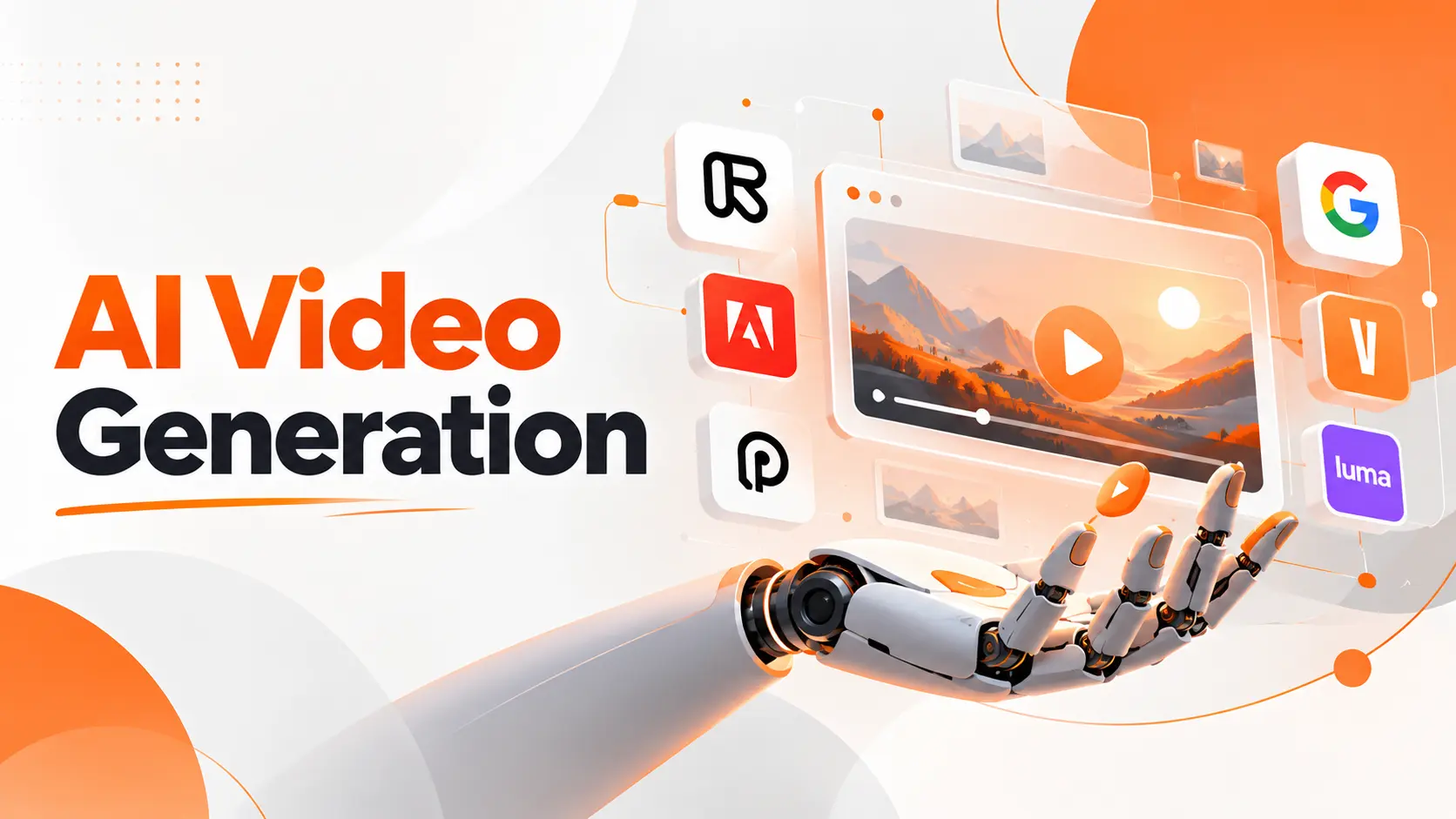
AI video generation turns written descriptions, images, and existing footage into moving videos using generative artificial intelligence. Instead of filming every scene or building animations from scratch, creators can describe a shot, provide a visual reference, and generate footage through an AI model.
The technology has changed what small teams can produce without a full video production setup. A startup can develop advertising concepts, animate product images, or create visual demonstrations using the same tools available to larger creative teams. The real challenge is no longer getting a video generated. It is producing footage that fits the intended message, maintains visual consistency, and works in a finished project.
How AI Video Generation Works
AI video generation uses models trained to represent visual appearance, movement, and relationships between frames. The model receives instructions or reference material and generates a sequence of images that form a moving scene.
Unlike traditional editing, which rearranges existing footage, generative video models create new visual content. The result can depict an imagined location, an animated product, or a scene that was never filmed.
Many modern video generation systems use diffusion techniques combined with architectures that model relationships across space and time. Diffusion helps construct visual content, while temporal modeling supports continuity between successive frames.
This distinction matters because generating one convincing image is different from maintaining a convincing scene throughout a video.
A successful result must preserve object identity, movement, lighting, and camera behavior across the sequence.
For example, imagine generating a video of a smartphone rotating on a desk. The model must preserve the phone's shape while changing its visible angle. It also needs to maintain appropriate reflections, shadows, and relationships with surrounding objects.
If those relationships break, the result can look convincing in individual frames but unnatural during playback.
The Video Generation Process
The process follows several connected stages:
Input interpretation: The model processes the written instructions, reference images, or existing footage.
Scene generation: It constructs visual content guided by the supplied information.
Motion synthesis: The model generates changes in objects, camera perspective, and scene composition over time.
Frame consistency: Spatial and temporal relationships help maintain continuity throughout the sequence.
Video output: The generated frames are assembled into a clip that can be reviewed, refined, and edited.
The exact process differs across model architectures, but these stages explain the practical relationship between the user's instructions and the resulting video.
From a production perspective, the most important consideration is how much control the chosen method gives the creator over the final scene.
Types of AI Video Generation
AI video creation is not limited to entering a text prompt. Different generation methods use different source materials, and each provides a distinct level of control.
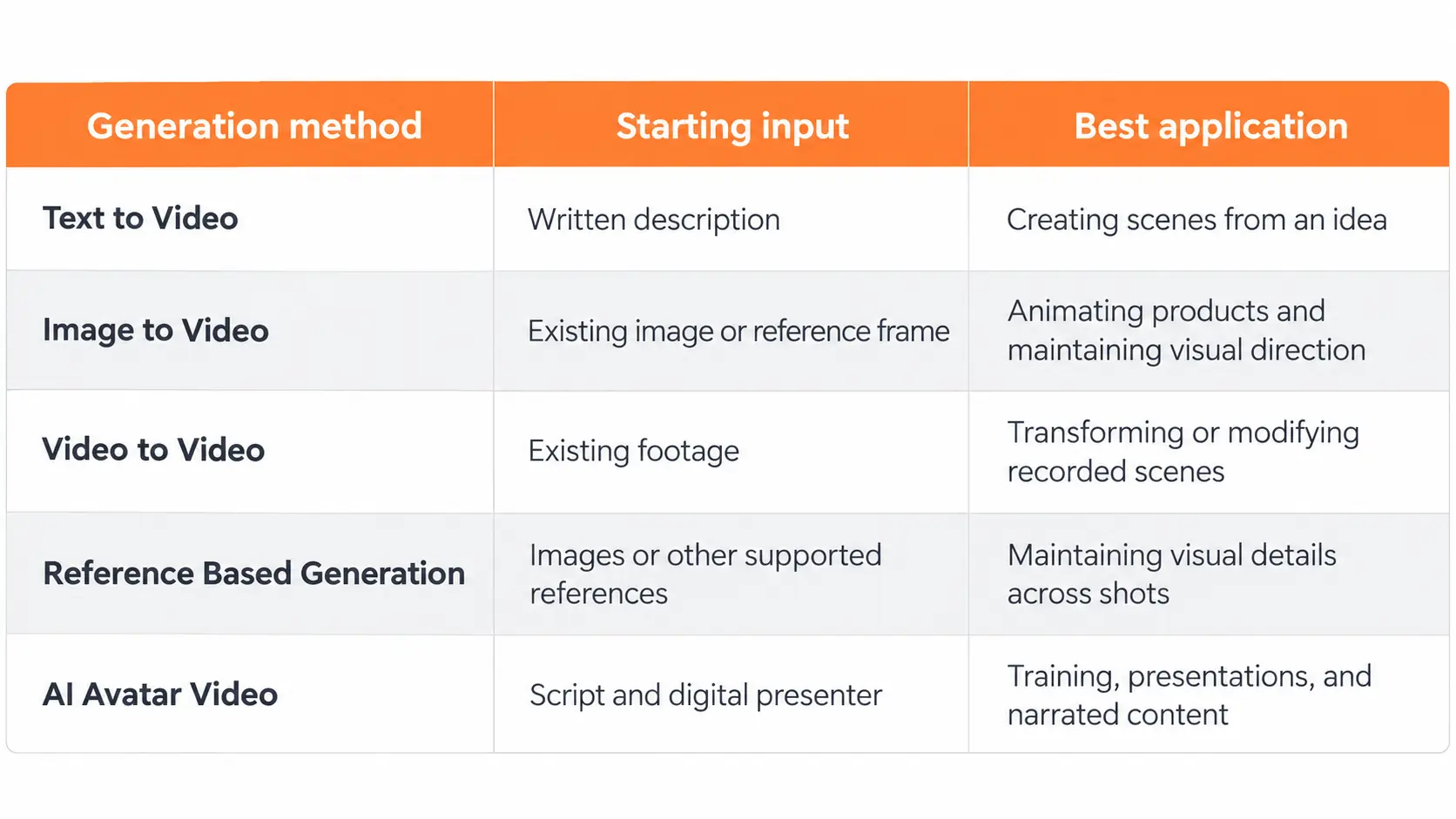
Choosing the method before selecting the tool prevents unnecessary work. A product image, for example, already contains important visual information that a text description would need to recreate.
Creating Scenes from Written Descriptions
Text to Video AI creates moving scenes directly from written instructions.
A creator describes the subject, environment, action, lighting, and camera movement. The model uses that description to produce a clip.
For a startup preparing an advertisement, the instruction could describe a futuristic workspace with a moving camera and illuminated screens.
This method is especially useful for concept development because it allows creative directions to be explored without preparing reference footage.
Its limitation is the amount of visual interpretation left to the model. If a company needs an exact product design, describing that product with text alone is less controlled than supplying an approved reference.
Animating Existing Images
Image to Video AI uses a still image as the visual foundation for generated motion.
Consider a fashion brand with professional product photographs. Instead of rebuilding each product in a text prompt, the company can animate an existing image with camera movement or environmental effects.
The original image establishes composition, colors, and visible design details.
The creator then specifies how the scene should move.
This approach gives teams a stronger visual starting point when the appearance of a particular object matters.
Transforming Existing Footage
Video to video generation begins with a recorded clip and changes selected visual characteristics using AI.
A creator can use this approach to explore alternative styles, backgrounds, or visual treatments while retaining parts of the original movement.
It is particularly useful when the timing and basic action have already been captured.
However, preserving every detail of the source footage is not guaranteed. The output still requires visual review, especially when the scene contains products, faces, or objects with strict appearance requirements.
Creating an AI Video from Start to Finish
The most useful way to understand the technology is through an actual production scenario.
Consider a software startup preparing a short promotional video for a new productivity application. The objective is to introduce the product, communicate its value, and encourage viewers to explore it.
I would structure the project around a small number of clear scenes rather than trying to generate the entire advertisement in one request.
Defining the Video Concept
The first decision is the message.
For the productivity application, the message could be that teams can organize projects and track their work from one place.
A simple video structure would be:
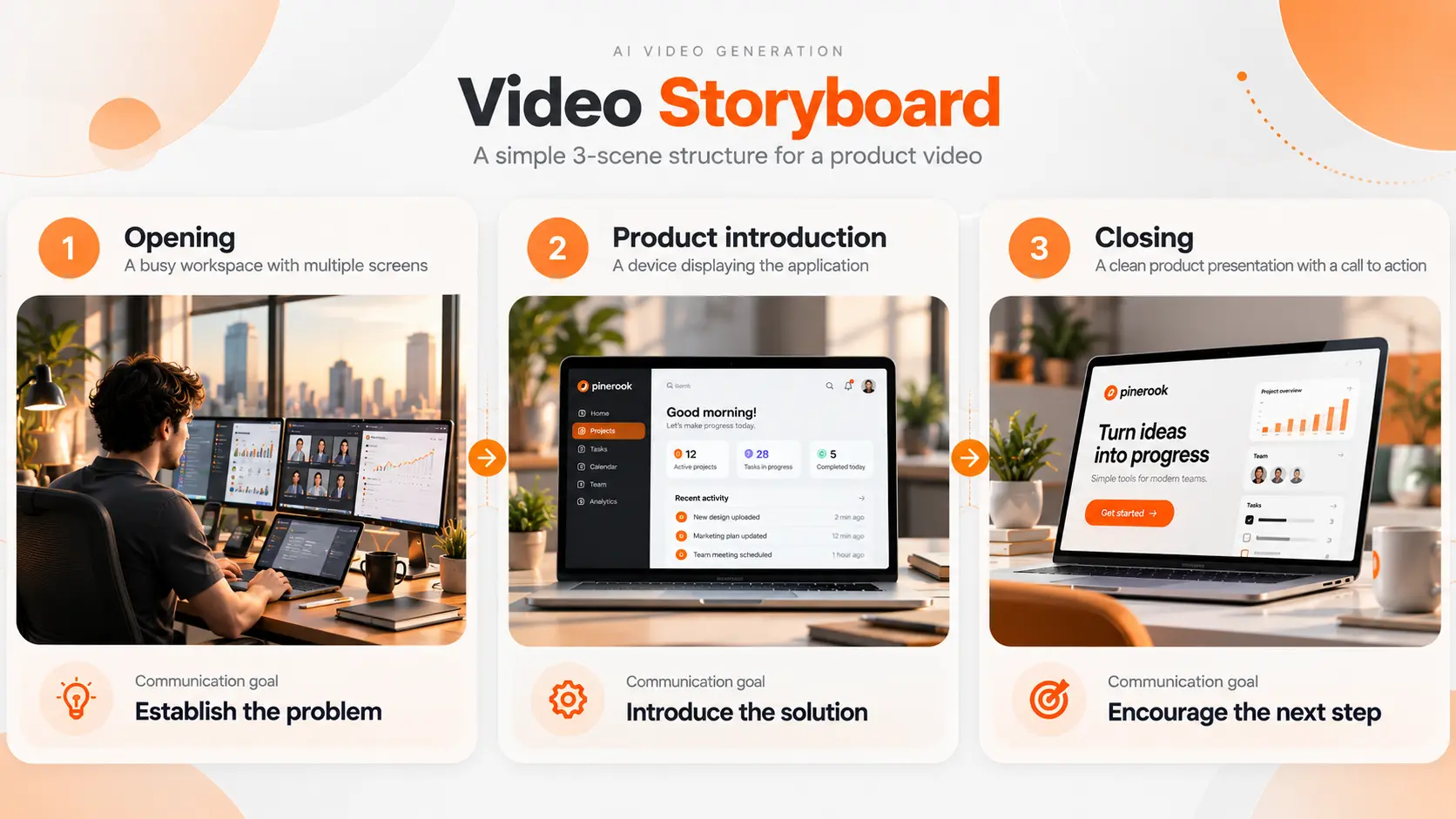
This structure creates a specific visual purpose for every shot.
It also separates generative footage from elements that require exact accuracy, such as the product interface and call to action.
Preparing the Visual Instructions
The next step is to describe the scene clearly.
AI Video Prompting determines how written instructions guide the generated content. Effective instructions identify the subject, its action, the setting, and the intended camera movement.
For the opening scene, I would begin with a description such as:
A modern workspace with several active monitors. The camera slowly moves toward the central desk. Soft daylight enters through a large window, creating a realistic corporate atmosphere.
The instruction provides the model with a defined subject, environment, movement, and visual style.
I prefer assigning one clear movement to each short shot. Combining several unrelated actions in a single generation makes the intended result harder to control and evaluate.
For the product introduction, an approved screenshot or product mockup provides a more dependable visual reference than asking a model to invent the interface.
Generating and Reviewing the First Clips
The first generation should be treated as a production draft.
I would examine whether the main subject is recognizable, the movement follows the intended direction, and the scene communicates the message without distracting visual changes.
If the camera movement is incorrect, the next generation should focus on that issue. If the product appearance is inaccurate, changing the input reference is more useful than repeatedly adjusting unrelated descriptive words.
This approach turns generation into a controlled editing process rather than an unpredictable series of experiments.
Maintaining Consistency Between Scenes
A multi scene video needs continuity.
AI Video Character Consistency addresses the challenge of preserving a recognizable character's appearance across generated shots. The same principle of visual continuity applies to products, environments, and brand elements.
Reference images and supported identity controls help maintain the intended appearance, but the output still needs inspection.
For a product advertisement, the device should retain the same color, shape, and visible features in every shot.
I would keep a single approved visual reference for each important object rather than allowing separate scenes to invent different versions of it.
Completing the Final Video
Once the generated scenes are approved, the remaining work belongs to video production.
The clips need to be arranged in the correct sequence, trimmed to the intended duration, and combined with the required sound, text, and branding.
AI generation does not eliminate the need for editing.
For a software advertisement, I would add final interface screenshots, pricing information, and the company logo as controlled editing elements. This avoids relying on a generative model to reproduce important text and visual details accurately.
The completed video should be reviewed at its actual publishing size, not only inside the generator's preview window.
AI Video Generation Models and Tools
A video generation model and an AI video generator are related but different.
The model is the underlying system that produces video content. The generator is the application or interface through which creators access one or more models and editing capabilities.
One platform can provide access to multiple models, while a single model can be available through different products.
This distinction matters when comparing tools because the quality of the generated footage is only part of the production experience.
As of October 2026, several established options illustrate different approaches.
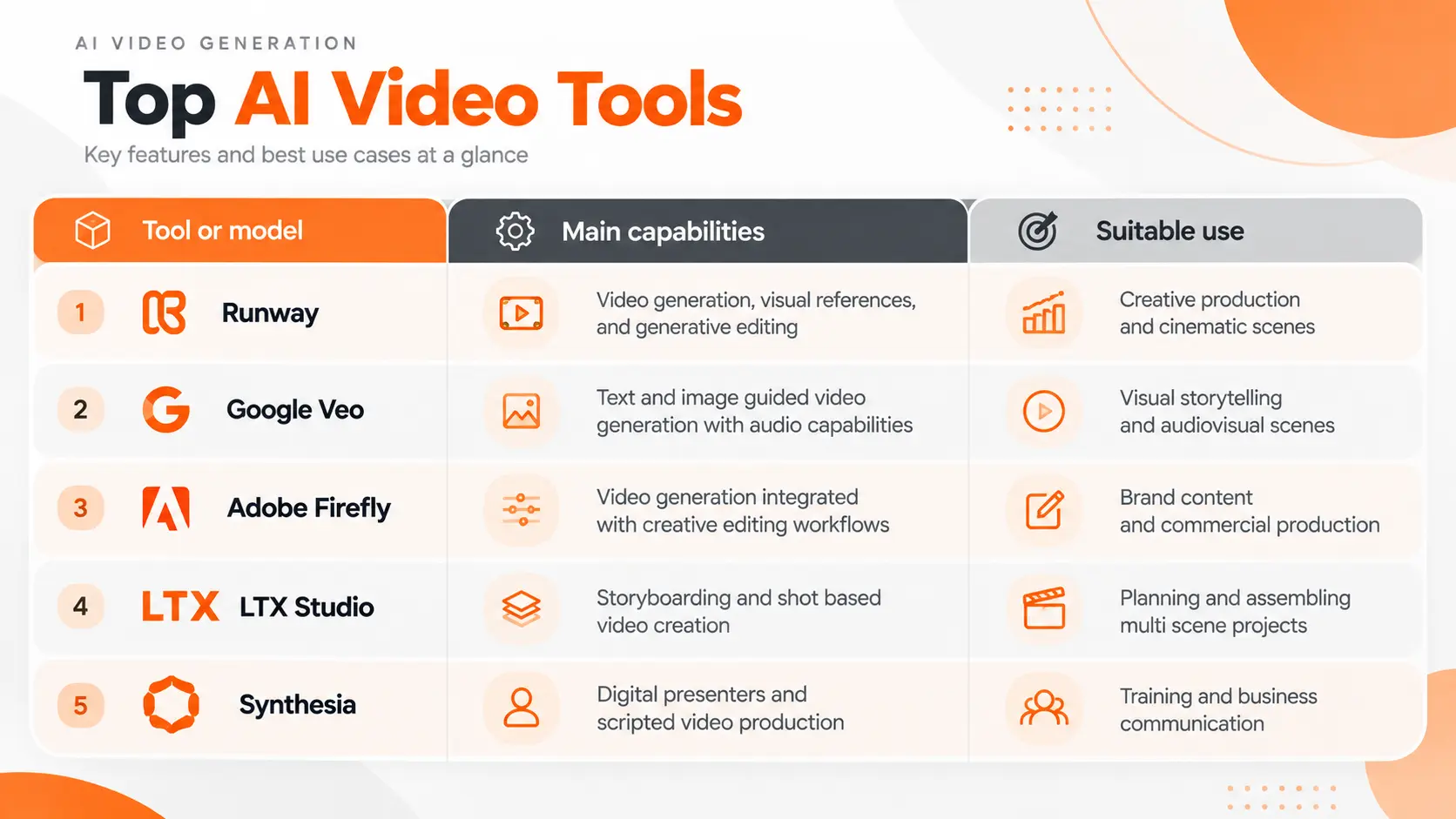
The purpose of this comparison is to identify different production approaches, not to assign a permanent ranking to the tools.
Runway supports text and image driven generation through its video models. Google's Veo family supports audiovisual generation and reference based controls. Adobe Firefly connects generative features with broader creative workflows, while Synthesia focuses on presenter based video production.
Product availability, model access, and generation limits can change across subscription plans.
A startup choosing a production platform should examine the complete workflow rather than selecting a model based on a single impressive demonstration.
Choosing the Right AI Video Generator
I would narrow the selection to five practical criteria.
Visual control: The generator needs to support the type of reference material and camera direction required by the project.
Consistency: Important objects, characters, and environments must remain recognizable across the final sequence.
Output requirements: Resolution, aspect ratio, duration, and available export formats need to match the distribution channel.
Production workflow: The tool should fit the team's editing process, including audio production and assembling multiple clips.
Commercial permissions: The license and content policies need to permit the intended use of the generated material.
The best platform for an imaginative cinematic sequence is not necessarily the best platform for a software demonstration or a company training video.
For product marketing, I would prioritize reliable visual references, usable exports, and integration with the existing editing process before adding more generation features.
AI Video Quality and Technical Limitations
A convincing video depends on more than image sharpness.
Movement, temporal consistency, object accuracy, and audio synchronization all affect whether a generated clip is suitable for publication.
Motion and Scene Continuity
Video generation models must maintain coherent movement across successive frames.
Complex actions create challenges when objects overlap, move rapidly, or change orientation.
A person walking behind another object must remain visually consistent after becoming visible again. A product rotating through several angles must retain its recognizable design.
These are practical quality requirements, not cosmetic details.
Resolution and Visual Detail
Generation resolution affects how much detail is available in the output.
However, resolution alone does not establish quality. A high resolution video with distorted objects or inconsistent movement remains unsuitable for professional use.
AI Video Upscaling can increase output resolution and improve the appearance of certain visual details. It cannot reliably reconstruct every missing element or correct the underlying scene's physical inconsistencies.
For business content, the original generation should meet the project's visual requirements before additional enhancement is considered.
Audio and Speech Synchronization
Some video models generate audio alongside the visual sequence. Other production workflows add speech, music, and sound effects after generating the footage.
AI Lip Sync Video focuses on matching visible mouth movements to spoken audio.
This becomes important for digital presenters, characters delivering dialogue, and localized marketing content.
Audio quality and visual synchronization must be evaluated together. A realistic image with inaccurate mouth movement or unnatural dialogue can weaken the entire presentation.
Longer Video Production
Generating a short, convincing shot and producing a complete advertisement are separate tasks.
A finished video requires continuity between scenes, consistent visual identity, suitable pacing, and coordinated audio.
For a longer project, I would use a storyboard and generate the required shots separately, then assemble the approved material.
This gives the production team greater control over the final message and allows individual scenes to be replaced without rebuilding the entire project.
AI Video Generation Costs
AI video generation costs depend on the platform, model, resolution, duration, and number of generations.
Providers use different pricing structures, including monthly subscriptions, generation credits, and usage based billing.
Some subscriptions include a defined allocation of video credits. Higher quality models or premium features can consume more credits than basic generation.
The most important expense is not always the cost of one generated clip. It is the cost of producing one usable final clip.
Consider a project that needs six finished shots.
If each approved shot requires three generations, the team completes eighteen generation attempts before final editing.
The production budget must account for those attempts, not just the six successful clips.For startups, I would test a limited set of representative scenes before committing to a larger production budget.
A short trial using the actual product visuals and required video format provides more useful purchasing evidence than comparing advertised maximum resolutions.
AI Video Generation Applications
AI video synthesis has applications across marketing, product development, training, and creative production.
Its value changes according to the work that would otherwise be required to produce the footage.
Product Marketing
Startups can generate visual concepts for advertisements, product launches, and promotional campaigns.
This is particularly useful when a team wants to explore several creative directions before selecting a final campaign.
For products requiring exact representation, generated footage should be combined with verified product images, real interface recordings, or approved design assets.
Social Media Content
AI video tools support short visual sequences for social platforms, including atmospheric footage, animated scenes, and promotional content.
A brand can create variations of a visual concept for different campaign formats.
The final output still needs to reflect the platform's aspect ratio, text placement, sound requirements, and audience expectations.
Education and Training
Organizations can produce visual explanations, simulated environments, and presenter based videos for training materials.
An instructional video can combine generated illustrations with scripted narration and verified technical information.
Where accuracy matters, generated scenes must not be presented as documentation of real events or processes unless that representation is supported by evidence.
Creative Development and Storyboarding
Filmmakers, designers, and advertising teams can explore lighting, composition, camera movement, and scene concepts before committing to production.
This makes AI video generation valuable during preproduction, where the objective is to visualize alternatives and communicate creative direction.
It does not require every generated scene to become part of the final published work.
Commercial Use and Copyright Considerations
Using AI generated video in a business project requires attention to both the source material and the generated output.
A platform's permission to use generated material commercially does not automatically resolve every copyright, trademark, privacy, or publicity rights question.
For example, uploading a photograph of a person, reproducing a recognizable brand, or incorporating protected creative material can introduce legal obligations beyond the generator's subscription terms.
The relevant questions include whether the company has permission to use its input materials, what the platform's current terms allow, and whether the resulting footage contains elements that require separate authorization.
Commercial use terms also differ between providers and models. A platform offering several generation models can apply different conditions to each.
I would verify those conditions before generating material for a paid advertisement or client project.
It is equally important to distinguish permission to use an output from ownership of enforceable copyright in that output. Copyright protection for AI generated material depends on applicable law and the nature of human creative contributions.
For business production, these considerations should be addressed before publication rather than after the finished video has been distributed.
Evaluating AI Generated Video Before Publishing
A video that looks impressive in a preview is not necessarily ready for an advertising campaign or product presentation.
I would review the completed material against the purpose established before generation.For a startup advertisement, I would pay particular attention to product accuracy and message clarity.
A visually impressive scene that misrepresents a product creates more problems than a simpler video that communicates the correct information.
The final decision should be based on whether the video serves its intended purpose, not whether the AI model produced a technically impressive result.
The Role of AI in Video Production
AI video generation has made it possible to create visual content from ideas, images, and existing footage without reproducing every step of traditional filming or animation.
Its strongest contribution is giving creators faster access to visual experimentation and new production possibilities.
For startups, this creates opportunities to test advertising concepts, develop product presentations, and produce creative assets without assembling a large production team for every project.
However, generating footage and producing an effective video remain different responsibilities.
The model creates the visual material. The creator determines the message, selects the appropriate inputs, evaluates the output, and decides what belongs in the finished video.
That combination of generative technology and deliberate creative direction is what makes AI video production useful for a real business.
FAQ
Can I make AI videos in languages other than English?
Yes. Several AI video platforms support multilingual prompts, narration, or speech generation. Language availability differs between models and features. For published content, generated dialogue should be checked by a proficient speaker for pronunciation, translation accuracy, and natural delivery.
Can I upload confidential product designs to an AI video tool?
Only after confirming that the provider's data handling terms meet the company's confidentiality requirements. Review storage, retention, training use, access controls, and deletion options. Sensitive prototypes and unreleased product information should not be uploaded without the necessary organizational approval.
Can I get the exact same video again using the same prompt?
Reproducibility depends on the model and its generation controls. Some systems support fixed random seeds, but matching a prompt and seed does not guarantee identical output across different model versions or processing configurations. Preserve approved exports rather than relying on regeneration.
Do I need to tell viewers that my video was made with AI?
Disclosure requirements depend on the publishing platform, jurisdiction, and content. Platforms can require labels for realistic synthetic or altered media, particularly when viewers could mistake it for authentic footage. Review the applicable policy before publication and disclose synthetic content when required.
Can I generate a video without music and add my own voice later?
Yes. A silent generated clip can be imported into a video editor and combined with a separately recorded voiceover, music, and sound effects. This gives creators direct control over narration timing and audio quality. If the video contains a speaking character, the visible mouth movements also need to match the final dialogue.
Fatemeh Jahangard
Technology & AI Writer at PinerookFatemeh Jahangard covers AI, emerging technologies, and digital innovation for Pinerook, focusing on how technology shapes startups and industries.
 Seen first.