Text to Video AI turns written descriptions into moving video clips. You describe a scene, its characters, actions, camera movement, and visual style, and an AI video generator produces footage based on those instructions. Tools such as Google Veo, Runway, Pika, and Adobe Firefly make it possible to create original visuals without filming the scene yourself.
The most useful part of AI Video Generation is turning an idea into footage that serves a specific purpose. I would start by deciding whether I need a cinematic scene, a product demonstration, or a complete narrated video. That choice determines the right tool, how to write the prompt, and how much editing the result will need.
How to Create an AI Video From Text
Creating a video from a text prompt starts with a clear description of the result. The more precisely the prompt explains the subject and movement, the easier it becomes to evaluate whether the generated clip matches the intended scene.
I would approach the process in five stages.
Choose the Video Generator
First, select a tool that supports direct generation from text.
Google Veo, Runway, Pika, and Adobe Firefly offer ways to generate video footage from written prompts. Canva also provides AI video creation within its design environment.
For a short cinematic scene, I would choose a generator that offers control over movement, framing, and visual style.
For a complete explainer containing narration, multiple scenes, and captions, I would look at a script based production tool instead.
These are different production workflows, even though both begin with text.
Describe the Scene and Movement
A useful prompt tells the generator what should appear on screen and how the scene should move.
Consider this basic instruction:
"Create a cinematic video of a coffee shop."
The subject is understandable, but the generator has little guidance about the action, camera position, lighting, or atmosphere.
I would make the description more specific:
"A cinematic close shot of a barista pouring steamed milk into a ceramic coffee cup. Morning sunlight enters through a large cafe window. The camera slowly moves closer as the milk forms a delicate pattern on the coffee surface. Warm natural lighting, realistic movement, and shallow depth of field."
This version identifies the subject, action, setting, camera movement, and visual appearance.
It also describes one continuous shot rather than asking the model to invent an entire story.
Configure the Video Settings
Before generating the clip, choose the output settings supported by the selected tool.
Aspect ratio: Use 16:9 for landscape video or 9:16 for vertical social media content.
Duration: Choose a length that accommodates the action. A simple camera movement needs less time than a sequence containing several events.
Resolution: Select an output quality that matches the intended publishing platform and available generation credits.
Visual style: Specify realistic footage, animation, illustration, or another supported appearance.
Audio: If the model supports synchronized audio generation, describe the desired dialogue, ambient sound, or sound effects.
I would establish the aspect ratio before generation rather than crop important visual elements from the finished clip.
Generate and Review the Clip
Submit the prompt and inspect the generated footage.
I would focus first on whether the main action actually happens as described.
For the coffee example, the important questions are whether the milk enters the cup correctly, the movement remains coherent, and the camera follows the intended direction.
Next, I would examine object consistency, lighting, and the appearance of individual frames.
A visually attractive opening frame does not guarantee that the rest of the clip is usable.
If the movement is wrong, I would revise the action description. If the subject changes appearance, I would simplify the scene or use reference based generation where the tool supports it.
Changing one important instruction at a time makes the revisions easier to evaluate.
Edit and Export the Video
The generated clip is a production asset, not necessarily a finished video.
For a social media post, I would trim unwanted frames, add accurate captions, adjust the sound, and place any required text or branding in a video editor.
A longer video can combine several generated clips with narration and transitions.
Before exporting, I would review the result at its intended viewing size, especially for vertical videos displayed on mobile devices.
Best Text to Video AI Tools by Use Case
Different video generators are designed around different workflows. I would choose one based on the output required rather than assume that a single platform is best for every project.
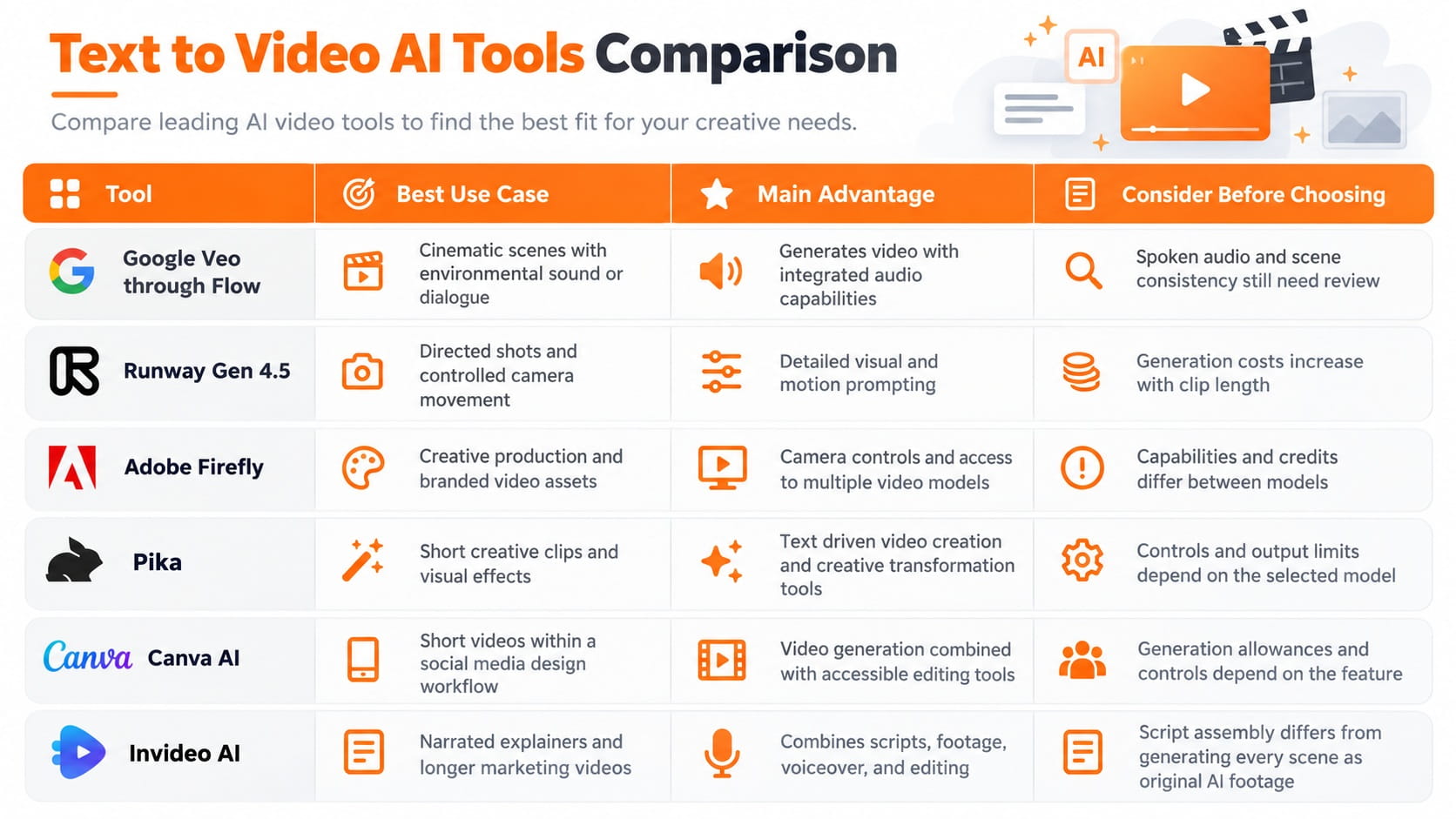
For an original cinematic sequence, I would begin with Google Veo or Runway.
For branded content already being prepared in an Adobe workflow, Firefly provides useful production controls.
For social media projects where design, captions, and layout matter alongside the footage, Canva offers a convenient editing environment.
For longer videos built around a written script, Invideo addresses a different requirement by assembling the content into a more complete production.
One important consideration is the availability of older tools. OpenAI discontinued the Sora web and app experiences in April 2026 and its API in September 2026. It should not be treated as an available consumer video generator when choosing a tool in October 2026.
Text to Video AI Prompt Examples
A strong video prompt describes a visible event. It gives the model enough information to establish the scene without filling the instruction with unrelated details.
I would use a different prompt structure depending on the type of video.
Cinematic Video Prompt
"A wide cinematic shot of a small wooden cabin surrounded by a snowy forest at sunrise. Gentle smoke rises from the chimney while snow falls between the trees. The camera slowly moves forward toward the cabin. Soft golden light, realistic snow movement, and a quiet winter atmosphere."
This prompt establishes a single environment, one continuous camera movement, and a consistent visual mood.
The subject remains clear throughout the scene.
Product Video Prompt
"A premium black wristwatch resting on a dark stone surface. Soft studio lighting creates controlled reflections across the metal case and glass. The camera slowly moves around the watch, revealing its dial and polished details. Minimal luxury advertising style, realistic materials, and a clean background."
This description focuses attention on the product and the intended camera motion.
For an actual commercial product, I would inspect the output carefully because a model can alter the watch's dial, markings, proportions, or other details.
When exact product identity matters, reference images and conventional product footage provide additional control.
Social Media Video Prompt
"A bright orange running shoe lands on a wet urban pavement in slow motion. Small water droplets scatter across the ground as the shoe makes contact. The camera follows the movement from a low angle. Energetic sports advertising style, dramatic lighting, and a sharp focus on the shoe."
The action is immediate and visually clear.
That makes the scene suitable for a short social media clip where the first seconds need to establish what the viewer is watching.
I would add headlines and promotional text during editing rather than depend on the generated video to reproduce exact typography.
Improving Text to Video AI Quality
A detailed prompt helps direct the output, but video quality also depends on how well the model maintains visual information across frames.
I would evaluate the following factors before accepting a clip for publication.
Motion and Physical Consistency
Motion is the central difference between generating a still image and generating a video.
A realistic scene requires objects to move coherently across consecutive frames.
When describing motion, I would identify the subject performing the action and specify its direction or speed.
For example, "a cyclist rides from left to right while the camera remains stationary" provides a clearer instruction than "a cyclist moves dramatically."
For scenes involving complex physical interactions, I would avoid combining several unrelated actions into one short clip.
The finished footage should be checked for changing object shapes, inconsistent contact with surfaces, and unnatural movements.
Camera Movement and Framing
Camera instructions shape how the viewer experiences the scene.
A slow push toward a subject creates a different visual result from a wide static shot.
I would choose one primary camera movement and describe it precisely.
For a product advertisement, a slow camera orbit can reveal different surfaces. For an atmospheric landscape, a gradual forward movement can establish depth.
If the camera moves too aggressively, it can distract from the main action or make visual inconsistencies more noticeable.
Character and Object Consistency
Maintaining the same character or product across multiple scenes is a separate challenge from creating one attractive clip.
A text description alone does not guarantee identical appearance across independent generations.
For connected scenes, I would use reference images, consistent descriptions, and supported character or object reference features.
If exact visual identity is essential, I would review every clip before adding it to the final sequence.
Text to Video AI offers creative control, but consistency needs to be treated as part of the production process.
Audio and Dialogue
Some modern video models generate synchronized audio alongside the visuals.
Google Veo, for example, supports dialogue, ambient sound, and sound effects as part of its video generation capabilities.
When using an audio capable model, I would describe what should be heard and how it relates to the visible action.
For a cafe scene, the prompt could include the sound of steaming milk, quiet conversation, and cups being placed on a counter.
Dialogue requires additional attention because speech quality, timing, and synchronization can affect whether the scene feels natural.
I would review the generated audio independently before using it in a published video.
Text to Video vs Image to Video vs Script to Video
These three workflows begin with different inputs and provide different levels of control.
Text to Video Generation
Text to Video begins with a written description of a scene.
The model generates its visual content and motion from those instructions.
This is suitable when there is no existing image or footage and the creator wants to produce an original scene.
For example, a prompt describing a spacecraft approaching a distant planet can generate a visual sequence without a source photograph.
Image to Video Generation
Image to Video starts with an existing image.
The model uses that image as a visual reference and generates motion based on additional instructions.
I would consider this workflow when the first frame, product appearance, or visual composition needs greater control.
It is particularly useful when a brand already has approved product photography or a defined illustration style.
Script to Video Production
Script to Video begins with narration, a written article, or a structured script.
The production tool arranges scenes using available footage, generated visuals, titles, music, and voiceover.
This approach is better suited to explainers, tutorials, and marketing videos containing multiple sections.
It does not mean that every visual frame is newly generated by a video model.
I would make this distinction before selecting a tool because the final output and required editing process are substantially different.
Free Text to Video AI Generators and Costs
Free Text to Video AI tools are useful for experimenting with prompts and evaluating generation quality before paying for a production plan.
However, free access does not automatically mean unrestricted video generation.
Platforms can limit the available models, generation credits, clip duration, resolution, export options, or commercial usage rights.
I would compare the actual production allowance rather than focus only on whether an account can be created for free.
The most useful cost measure is the number of usable clips produced within the available budget.
For example, generating a short clip several times to correct its motion consumes more resources than accepting the first result.
Higher resolution, longer duration, and additional audio generation can also affect costs depending on the platform.
Before choosing a paid plan, I would produce a small sample in the intended visual style and examine how much revision it needs.
That provides a stronger basis for deciding whether a video generator fits the project than promotional examples alone.
Creating Longer Videos From AI Generated Clips
Text to Video models are especially useful for producing individual scenes.
A complete video requires those scenes to connect into a coherent sequence.
For a thirty second product advertisement, I would begin with a simple scene plan rather than request the entire commercial in one prompt.
The opening could introduce the product. The next shot could reveal its design, followed by a scene showing it in use.
Each clip would have one clear visual objective.
I would maintain the same aspect ratio, lighting direction, visual style, and product references across the sequence.
The generated clips can then be assembled in an editor with transitions, sound, and the final promotional message.
This gives the creator more control over pacing and allows an unsuccessful scene to be replaced without rebuilding the entire video.
The same approach applies to educational videos, social media campaigns, and visual storytelling.
Text to Video AI for Business and Content Creation
Text to Video AI can support several practical production needs.
Marketing and advertising: Generate concept footage, backgrounds, product mood shots, and visual ideas before committing to a larger production.
Social media content: Create short visual sequences for Reels, Shorts, and other video formats.
Education: Illustrate concepts that are difficult to show using existing footage.
Film planning: Develop visual references for camera movement, scene composition, and atmosphere.
Startup product storytelling: Create visual demonstrations of an idea before the final physical product or production environment exists.
I would distinguish between footage intended to communicate a concept and footage intended to represent a real product or event.
Generated imagery can communicate an idea effectively, but visual details must be verified when accuracy matters.
For commercial projects, I would also check the selected platform's licensing conditions and review any content involving protected brands, identifiable people, or third party materials.
Conclusion
Text to Video AI makes it possible to transform written ideas into moving footage without starting with a camera or an existing video.
The most effective workflow begins with the intended output, followed by selecting an appropriate generator, writing a clear visual prompt, and reviewing the resulting motion and scene consistency.
I would choose Google Veo or Runway for directed cinematic footage, consider Firefly and Pika for creative production, and use Canva or Invideo when design and video assembly are central to the project.
The objective is not to generate as many clips as possible. It is to produce footage that communicates the intended scene clearly and can be used in a finished video with minimal unnecessary revision.
FAQ
Can I make AI videos without signing up for an account?
Account requirements depend on the video generation platform. Many established services require registration to manage generation credits, saved projects, and exports. Online demonstrations without registration should be reviewed for usage restrictions and the handling of submitted prompts.
Can I write my video prompt in another language?
Multilingual prompt support depends on the selected model. A service may accept a prompt in one language while providing stronger instruction following in another. For projects requiring precise scene control, the supported languages should be checked in the platform documentation, and the resulting footage should be evaluated against the original instructions.
Can I use my own voice in an AI generated video?
Yes, through tools that support voice recording, audio uploads, or authorized voice replication. The available workflow depends on the service. Using an existing voice recording does not require the video model itself to generate that voice. Voice replication should be performed only with the necessary authorization.
Can I generate exactly the same video twice with the same prompt?
Identical wording does not guarantee identical output. Some systems provide seed controls that improve reproducibility under consistent settings, but changes in the model version or generation configuration can affect the result. Projects requiring a specific visual should preserve the original generated file rather than depend on recreating it.
Can I monetize AI generated videos on YouTube?
AI generated videos are not automatically excluded from monetization because AI was used. Eligibility depends on YouTube's current monetization policies, the originality and value of the content, and compliance with applicable disclosure and rights requirements. The video generator's commercial licensing terms must also permit the intended use.
Fatemeh Jahangard
Technology & AI Writer at PinerookFatemeh Jahangard covers AI, emerging technologies, and digital innovation for Pinerook, focusing on how technology shapes startups and industries.
 Seen first.