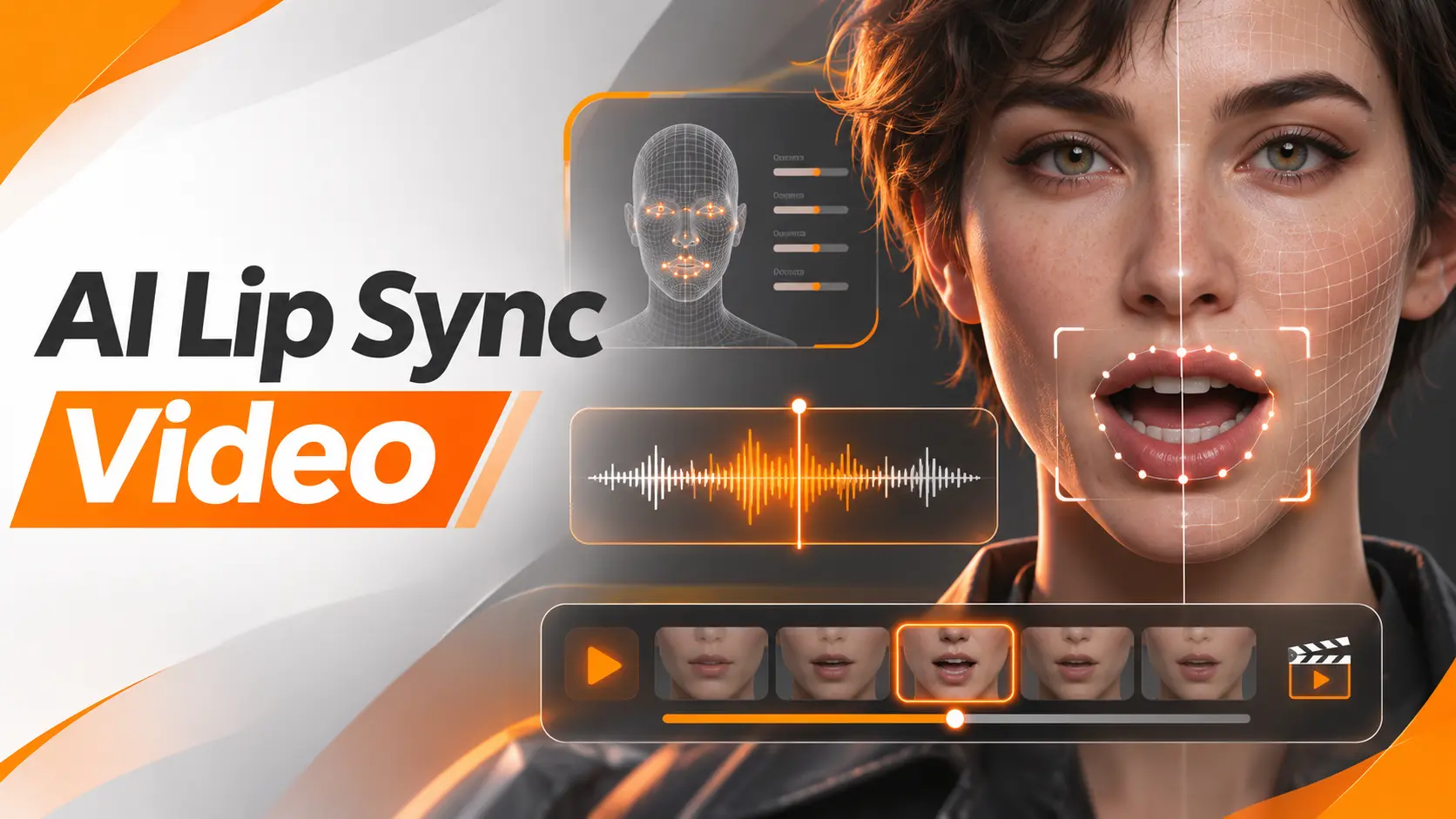
AI lip sync video technology matches a person's mouth movements to spoken audio, allowing creators to make a photograph talk, replace dialogue in existing footage, or synchronize translated speech with a video. The basic process is straightforward: provide a visible face, add the intended audio, and generate a new video with synchronized lip movement. The quality of the result depends on the source material and the type of synchronization the tool supports.
For creators using AI Video Generation, lip synchronization is particularly useful when a finished character needs dialogue or an existing video needs a different voice. I would start by deciding whether the project needs a talking photograph, an updated recording, or a translated version. Each requires a different workflow, even though the final goal is the same.
Creating an AI Lip Sync Video
You can create an AI lip sync video using a clear photograph or a video with a visible speaker, together with recorded or generated speech. The selected tool analyzes the audio and produces mouth movements that correspond to the spoken words.
Here is the process I recommend for a first project.
1. Prepare the visual source
Choose a photograph or video showing the speaker's face clearly.
For a photograph, use a sharp portrait with the mouth visible, natural lighting, and an unobstructed view of the face.
For existing footage, select a section where the speaker remains visible and the camera does not cut away during the dialogue.
2. Prepare the audio
Record the dialogue or generate a voice from an approved script.
For example, imagine creating a short announcement for a mobile application:
"Your order is ready. You can track its delivery directly in the app."
I would record this sentence with natural pacing, leaving a brief pause at the beginning and end.
Listen to the audio before uploading it. Remove unwanted noise and confirm that every word is pronounced correctly.
3. Select the appropriate lip sync workflow
Open an AI lip sync generator and choose the mode that matches your source.
For a photograph, select a talking photo or image animation workflow.
For an existing video, select a feature designed to synchronize new audio with recorded footage.
A tool that animates still portraits does not automatically offer dialogue replacement for existing videos.
4. Add the audio and generate
Upload the voice recording or use the supported text to speech feature.
Select the available generation settings and confirm that the audio duration meets the tool's requirements.
Start the generation and let the model create the synchronized video.
5. Review the complete clip
Play the finished video with sound.
Pay attention to the beginning of each word, the movement of the lips during speech, and the transition back to a closed or resting mouth during pauses.
I would check the facial expression and head movement as well. A correctly timed mouth does not make the whole performance convincing if the rest of the face remains unnatural.
After approving the result, export the clip and complete any additional editing.
Best AI Lip Sync Video Generators
The best AI lip sync generator depends on what you already have.
If your starting point is a photograph, choose a tool designed for talking characters. If you have a recorded video and a replacement audio track, use a tool that can modify the existing mouth movement.
For multilingual projects, a video translation platform offers a more complete workflow.
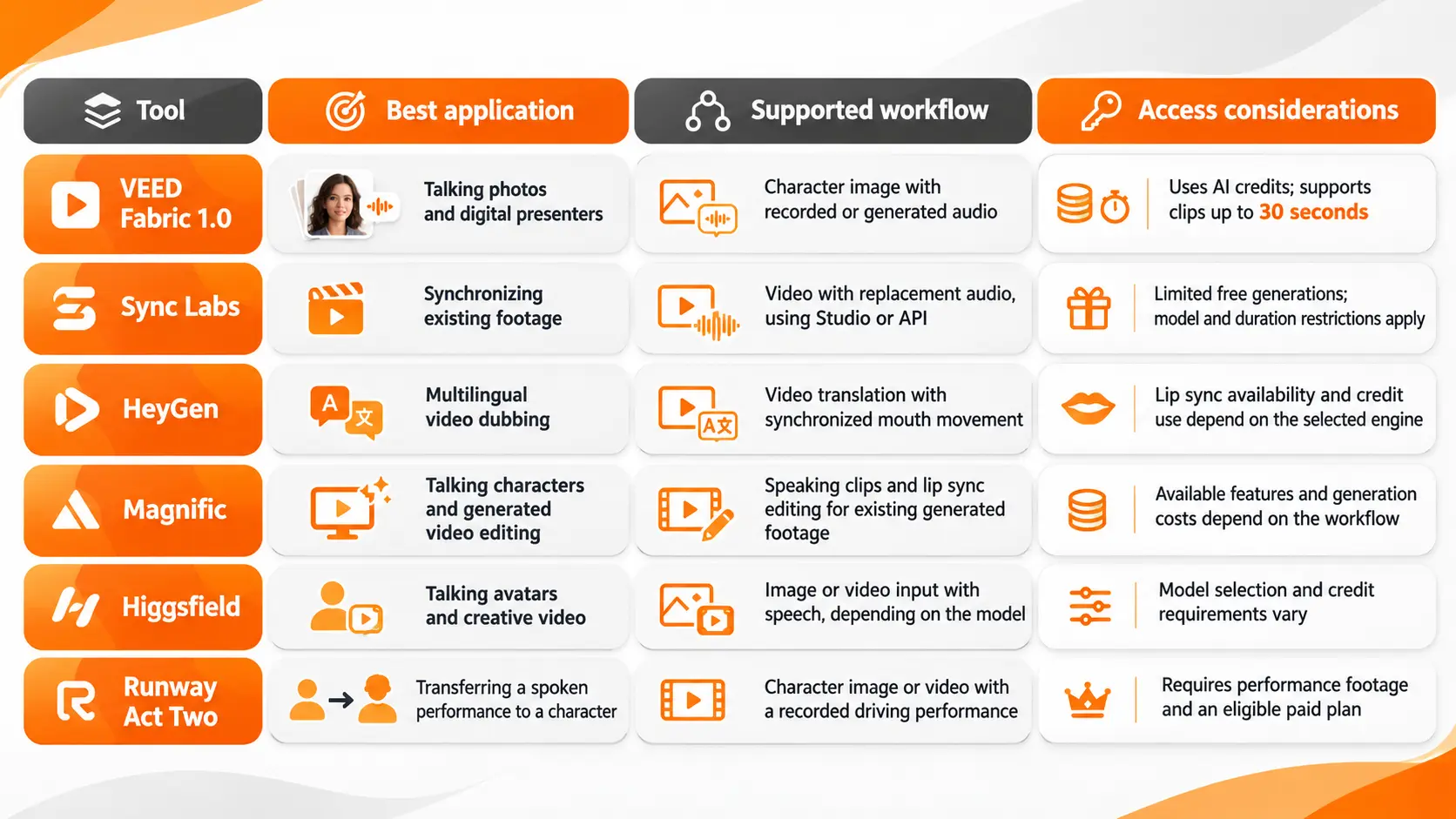
VEED for Talking Photos
VEED Fabric 1.0 creates a talking video from a character image and audio.
You can upload a portrait, record speech, provide an audio file, or use generated narration.
I would consider it for a short social media presenter, product announcement, or illustrated character that needs to deliver a prepared message.
The dedicated Fabric workflow supports clips up to 30 seconds, with access controlled through AI credits.
Sync Labs for Existing Footage
Sync Labs focuses on matching new audio to video footage.
Its Studio and API provide workflows for creators and developers who already have a video and want the visible speaker's mouth to match different speech.
I would consider Sync when the dialogue has already been recorded and the project does not require a new avatar.
It is important to understand that lip synchronization and voice generation are separate tasks. The replacement audio must be prepared before it is synchronized unless another supported service or workflow creates it.
HeyGen for Video Translation
HeyGen combines video translation with audio generation and lip synchronization.
Its Video Translation workflow lets creators upload footage and choose a target language.
The available processing engines determine whether lip synchronization is included.
This makes HeyGen relevant for educational videos, product demonstrations, and marketing campaigns that need versions in several languages.
Magnific and Higgsfield for Creative Content
Magnific supports speaking character creation and lip synchronization within its video editing workflows.
Higgsfield provides several speech driven video models through Lipsync Studio, including models designed for images and existing footage.
I would select between them based on whether the project requires a newly animated character or additional synchronization in an established video.
The exact model matters more than the platform name because the supported inputs and controls differ.
Runway Act Two for Performance Transfer
Runway's previous standalone Lip Sync tool was discontinued in May 2026.
Its Act Two workflow offers a different approach: it uses a recorded performance to transfer speech, facial movement, and expressions to a character.
This is useful when the acting performance is as important as the spoken words.
However, Act Two requires a driving performance video. It should not be confused with a simple workflow that accepts only a portrait and an audio recording.
Creating AI Lip Sync from a Photo
A talking photo starts with a single image, so the model must create facial movement that does not exist in the source.
That makes the portrait itself an important production decision.
I would choose an image where the subject faces the camera, the lips are visible, and the facial features are sharply defined.
An image with strong shadows across the mouth or hair covering part of the face provides less visual information for synchronization.
The expression should also suit the speech.
For a professional announcement, a relaxed and attentive expression is appropriate. For an enthusiastic product introduction, a slight smile can support the tone of the recording.
Once the portrait is ready, upload it to an image based lip sync tool and add the audio.
For a fictional startup spokesperson, a short script could read:
"Welcome to our platform. Today, I want to show you how to manage your projects in one place."
The generator creates mouth movement and additional facial animation from the still image.
I would review the result at normal playback speed and check whether the eyes, expression, and head movement support the spoken message.
A convincing talking photo needs more than an animated mouth. The face should appear to participate in the speech.
Lip Syncing an Existing Video
Synchronizing an existing video is different from animating a photograph.
The footage already contains facial movement, head position, lighting, and camera motion. The task is to change the mouth movement so it follows the replacement audio while preserving the rest of the recorded performance.
Consider a product demonstration where the presenter says:
"Our new dashboard launches next week."
The launch date changes, and the company needs the presenter to say:
"Our new dashboard is available today."
Instead of recording the entire demonstration again, a compatible lip sync tool can generate new mouth movement for the updated audio.
For this workflow, I would first isolate the section containing the original sentence.
Next, prepare the replacement recording and select the video synchronization mode.
The new audio should match the intended timing of the edited scene. If the new sentence is longer, the project needs enough video duration to accommodate the dialogue.
After generating the updated clip, compare it with the original footage.
The head position, lighting, background, and nonverbal movement should remain appropriate to the scene.
If the tool changes unrelated facial features or introduces visible distortion around the mouth, the result needs another review before publication.
This workflow is particularly useful for correcting approved scripts, updating product messages, and creating alternative versions of existing recordings.
AI Lip Sync for Video Dubbing
Dubbing adds another requirement: the dialogue must communicate the correct meaning in a different language.
A direct translation does not automatically produce natural spoken dialogue or suitable lip movement.
For a multilingual video, I would organize the work in this order.
First, finalize the translated script.
Check the meaning, product terminology, names, and any statements that need to remain identical to the original message.
A translation should sound natural when spoken, rather than simply matching the original words.
Second, prepare the translated voice.
Use an authorized voice recording or a supported speech generation tool.
The delivery should reflect the tone of the original video. A calm explanation should not become an overly enthusiastic performance.
Third, synchronize the mouth movement.
Upload the video and translated voice to a compatible dubbing or lip sync platform.
In HeyGen, for example, video translation supports engines that include lip synchronization rather than audio replacement alone.
Finally, review the localized video.
Check both the accuracy of the language and the visual synchronization.
The new language can contain more syllables or require different speaking durations. That affects the timing of the mouth movements and pauses.
I would ask someone proficient in the target language to review the final narration before publishing.
A visually convincing video is not an acceptable translation if the dialogue changes the meaning of the message.
Free AI Lip Sync Video Generators
Free AI lip sync tools are useful for testing whether a source image or video is suitable for synchronization.
However, free access is not equivalent to unrestricted commercial production.
Sync Labs documents a limited free trial for its lip sync models. VEED Fabric uses AI credits, and access to longer clips depends on the available credit allowance and subscription.
Before selecting a free AI lip sync generator, I would examine the permitted generation duration, watermark policy, supported media types, and export restrictions.
The type of free access also matters.
A tool that offers a few short generations is suitable for evaluating mouth movement. A tool that requires payment to export an approved clip may not meet the requirements of a finished client project.
For testing, use a short recording with clear speech and a visible face.
This gives you a practical way to compare synchronization quality without consuming credits on a complete video.
Improving AI Lip Sync Accuracy
The most effective improvements begin with the source image, video, and audio.
Increasing the output resolution cannot correct a poorly synchronized mouth.
Audio Clarity and Speech Timing
The audio recording controls the timing of the intended dialogue.
Background conversations, excessive noise, and unclear pronunciation make the speech input harder to process.
I would use one clean voice track with consistent volume and preserve natural pauses between sentences.
Listen carefully for words that begin with sounds requiring the lips to close, such as the English sounds represented by P, B, and M.
These moments provide useful checkpoints because visible mouth closure is part of producing those sounds.
If the mouth remains open throughout a word that requires closure, the synchronization is visibly inaccurate.
Face Visibility and Camera Angle
A clear view of the mouth provides better visual guidance.
Strong side angles, rapid head turns, objects passing in front of the face, and frequent scene cuts make synchronization more demanding.
For a recorded presenter, I would begin with a section where the face stays visible and the camera framing remains consistent.
That makes it easier to assess the technology before applying it to more complicated footage.
Expressions and Head Movement
Lip synchronization should be judged as part of the full facial performance.
The mouth may follow the words while the speaker's expression remains unchanged.
A cheerful message delivered by a character with a fixed, emotionless face feels disconnected from the audio.
I would compare the emotional tone of the voice with the eyes, facial expression, and head movement.
For animation workflows with expression controls, adjust those settings only after confirming the basic speech synchronization.
Final Video Review
I would review the opening words, a sentence containing several distinct mouth shapes, and the ending of the clip.
Check that the mouth returns to a natural resting position during silence.
Then watch the video continuously with sound.
A frame that looks accurate on its own can still be part of an unnatural transition.
The complete performance matters more than an isolated screenshot.
AI Lip Sync Pricing and Output Limits
AI lip sync pricing depends on the generation model, video duration, subscription plan, and processing method.
Some tools charge through credits. Others use an allowance measured in video minutes or seconds.
I would calculate the cost using the amount of finished footage the project needs.
For example, a company producing ten localized training clips needs to account for every language version, not only the original recording.
If a thirty second video is translated into four languages, the project requires two minutes of localized output before accounting for revisions.
It is also important to distinguish between a plan's general video allowance and the amount available for the specific lip sync feature.
Some platforms charge more for higher quality processing or more advanced synchronization models.
Before paying, confirm the maximum clip duration, export resolution, supported languages, watermark restrictions, and permission to use the output commercially.
Consent and Authenticity in AI Lip Sync Videos
Lip synchronization can make a real person appear to say words they never recorded.
That makes consent and accurate presentation essential.
For a business project, obtain the appropriate authorization before modifying a person's facial performance or using their voice.
The permission should cover the intended use, including advertising, translation, and distribution.
A client's permission to edit a video does not automatically establish permission to create an unrelated statement in the speaker's voice.
I would also ensure that synthetic or altered speech is not presented in a way that misleads viewers about what the person actually said.
For fictional characters, confirm that the visual assets and voice recordings are licensed for the intended project.
The objective is to use lip synchronization as a production technique while preserving trust in the finished content.
Final Thoughts
AI lip sync video tools make it possible to create talking characters, update existing recordings, and produce localized videos without manually animating every mouth movement.
The most important decision is selecting the workflow that matches the source material.
A photograph needs facial animation. Existing footage needs dialogue synchronization. Multilingual content requires accurate translation and speech timing before the lips are adjusted.
For professional work, I would prioritize a clear audio recording, visible facial features, and careful review of the final performance over unnecessary visual effects.
The result should do more than move a character's mouth. It should make the spoken dialogue feel like a natural part of the video.
FAQ
Can I make two people talk in the same AI lip sync video?
Yes, but the selected platform must support the required speaker workflow. One approach is to process each speaker separately and combine the results during editing. Runway documents a method for handling multiple characters through separate performance transfers and compositing.
Can I use AI lip sync for a character singing a song?
Yes, some lip sync models support singing as an audio input. The result depends on the model's ability to follow sustained vowel sounds and rapid changes in pronunciation. Copyright and recording rights must be considered before using commercial music or another person's vocal performance.
Can I make a cartoon animal talk with AI lip sync?
That depends on the character design and the selected model. Tools designed for human facial structures may not support animal faces. Characters with recognizable humanlike facial features are better suited to supported portrait animation workflows.
Can I lip sync a video that has no original audio?
Yes. Certain tools accept silent footage together with a new audio recording. Sync Labs supports this workflow when the source video shows suitable facial and speaking movement. A completely static or closed mouth throughout the original video can require a different animation approach.
Can I change only one sentence without replacing the whole video?
Yes, when the selected editing workflow supports localized dialogue changes or the relevant scene can be processed separately. Export the affected section, synchronize the replacement speech, and insert the updated clip into the original edit. Match the timing, lighting, and surrounding audio at the edit boundaries.
Fatemeh Jahangard
Technology & AI Writer at PinerookFatemeh Jahangard covers AI, emerging technologies, and digital innovation for Pinerook, focusing on how technology shapes startups and industries.
 Seen first.