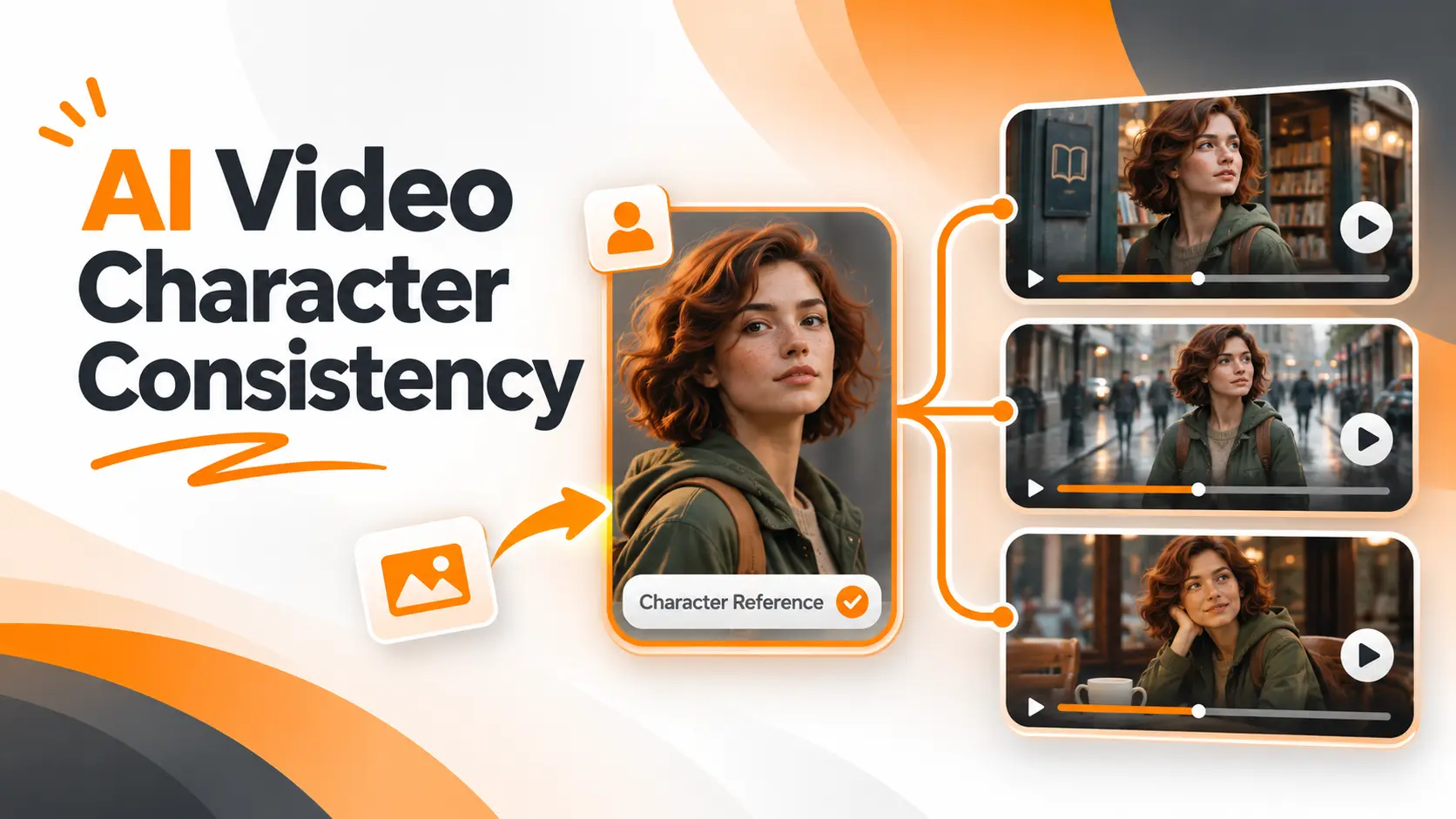
AI video character consistency means keeping the same recognizable character across different scenes, camera angles, and generated clips. The most effective starting point is an approved character reference that guides every new scene. Repeating a written description alone does not reliably preserve facial features, hairstyle, clothing, or body proportions.
In AI Video Generation, creating an attractive character is only the beginning. The real challenge comes when that character needs to appear in another location, perform a different action, or return in the next episode. A reliable production workflow separates the character's identity from the details that change between scenes.
Keeping the Same Character Across AI Videos
To maintain character consistency across AI videos, I recommend creating one approved character reference, using it to prepare each scene, and generating the final video clips from those approved images.
The process has five steps.
1. Approve one master character image
Choose a clear image showing the character's defining facial features, hairstyle, and overall appearance.
This becomes the primary identity reference for the project. Keep the original file rather than replacing it with images generated later.
2. Prepare additional character views
Create a front view, a three quarter view, and a profile view of the same character.
Include a full body image if the story requires walking, standing, or other actions that reveal body proportions and clothing.
Only use the number of images supported by the selected generation mode.
3. Create a starting image for each scene
Use the approved character reference to generate a new still image in the required location.
For example, the same character can appear outside a bookstore, walking along a street, and sitting inside a cafe.
Inspect each scene image before animating it. If the face has changed, correct the still image first.
4. Animate the approved scenes
Upload each accepted scene image into an image to video workflow.
Describe the movement you want, such as walking forward, turning toward a window, or moving the camera closer.
Keep the action focused. A simple movement gives the model fewer new visual details to reconstruct.
5. Compare the clips before editing
Check the face, hair, clothing, body proportions, and distinctive accessories in every generated clip.
Compare them with the original character reference, not only with the preceding video.
Once the clips meet the visual requirements, combine them into the final sequence.
This approach gives every scene the same identity reference while allowing the setting and action to change.
Creating an AI Character Reference Sheet
A character reference sheet is the visual record of the person or illustrated figure you want to reproduce.
For a continuing video series, I would prepare this before generating the first scene.
Defining the Character's Identity
Begin with the features that make the character recognizable.
These include facial structure, eye shape, nose, hairstyle, skin tone, and body proportions. Distinctive features such as freckles, glasses, or facial hair also belong in the reference.
For a fictional character, consider this description:
"Mara is a young woman with short auburn curls, light freckles across her nose, an oval face, and brown eyes. She has a slender build and wears an olive green raincoat with a tan canvas messenger bag."
The description provides a written identity record, but the approved image remains the main visual reference.
I would separate the character's physical identity from the outfit and accessories.
Facial features should remain recognizable throughout the story. Clothing can change when the narrative requires it, but the change must be intentional.
Preparing Reference Angles
A front facing portrait establishes facial proportions and distinctive features.
A three quarter view provides additional information about the shape of the face. A profile view helps define the nose, jawline, and hairstyle from the side.
A full body reference records height proportions, clothing length, and the character's overall silhouette.
Use clear images with visible facial details and controlled lighting.
Do not treat several unrelated generated portraits as references for the same person. First verify that every view represents the approved character.
For platforms that accept several reference images, upload the supported views. For a workflow that accepts only one starting frame, create a separate approved scene image before video generation.
Organizing Character Assets
Save the master portrait, additional angles, approved outfit variations, and final scene images as separate assets.
I would also keep a short written record of the character's defining features.
This becomes useful when a project expands from three scenes to multiple episodes.
If a newly generated image changes the jawline or hairstyle, the original reference provides a clear basis for rejecting it.
Character Consistency Across Three Scenes
A practical way to understand the workflow is to plan three scenes featuring the same fictional character.
For this example, Mara has short auburn curls, freckles, an olive green raincoat, and a tan messenger bag.
The goal is to preserve her identity and outfit while changing the environment, camera position, and action.
These are example instructions for a production workflow, not the results of a completed model test.
Scene One: Outside the Bookstore
First, create a still image using Mara's approved identity reference.
Scene image prompt:
"Using the attached Mara character reference, create a medium shot of Mara standing outside a neighborhood bookstore at sunrise. Preserve her facial structure, auburn curls, freckles, olive green raincoat, and tan messenger bag. Natural cinematic lighting."
Review the image and compare Mara's face with the master reference.
Once the image is approved, animate it.
Video motion prompt:
"Mara slowly turns her head toward the bookstore window. The camera remains stationary at eye level. Her movement is natural and controlled."
The movement keeps the character's face visible and does not require a dramatic change in perspective.
Scene Two: Walking Through the City
The second scene changes Mara's location and body position.
Use the original identity reference again rather than relying exclusively on the previous generated frame.
Scene image prompt:
"Using the approved Mara character reference, show Mara walking along a city sidewalk after rainfall. Preserve her facial features, hairstyle, raincoat, and messenger bag. Medium three quarter shot with realistic city lighting."
After reviewing the still image, generate the movement.
Video motion prompt:
"The camera tracks alongside Mara as she walks forward at a steady pace. Her hair moves gently in the breeze while she looks ahead."
This shot introduces a more demanding action because the model must maintain Mara's appearance while her body and the camera move.
Inspect the face and clothing throughout the clip, especially when her head changes angle.
Scene Three: Inside the Cafe
The final scene brings Mara indoors.
The lighting changes, but her identity and outfit remain the same.
Scene image prompt:
"Using the same approved Mara reference, show Mara seated beside a cafe window. Preserve her facial structure, freckles, auburn curls, olive green raincoat, and tan messenger bag. Warm indoor lighting, medium shot."
Once the starting frame matches the character reference, animate the scene.
Video motion prompt:
"Mara looks toward the window and gives a subtle smile. The camera slowly moves closer while her posture remains relaxed."
Now compare the final clip with the first two scenes.
Her expression and surroundings have changed, but her defining features should remain recognizable.
The important production decision is to approve each scene before generating the next one. This prevents an altered character from becoming the reference for the rest of the project.
AI Video Character Consistency Tools
Different AI video tools provide different ways to reuse character references.
The distinction matters because a starting frame, a reusable character asset, and multiple reference images are not the same feature.
Runway
Runway supports character consistency through its image reference workflow.
With Gen 4 References, creators can use an approved image to generate new images of the same character in different locations, lighting conditions, and compositions.
I would use this workflow to prepare the individual scene images first.
Once the character looks correct in each location, those images can be animated using a supported Runway image to video model.
This separates character appearance from video motion and allows the starting frame to be reviewed before animation.
Kling AI
Kling AI provides an Element Library for reusable characters, objects, and scenes.
A character element can be built from reference images and used in compatible generation workflows.
This approach is useful for a continuing series because the character exists as a reusable project asset rather than a description that must be recreated from scratch.
Kling also supports additional element binding and reference controls in specific models.
I would confirm the available Element Library controls in the selected video model before planning the production.
Google Flow and Veo
Google Flow supports visual references through Ingredients and character based workflows.
Reference images can guide the appearance of characters and important objects across video clips.
For a multi scene story, the same character reference can be reused while the prompt describes a different environment or action.
I would keep the reference assets in the project and confirm that the intended character is attached to each generation.
Magic Hour
Magic Hour provides a reusable Characters feature for supported image and video workflows.
Creators can save a character using reference photographs and select that character when generating new content.
This reduces the need to rebuild the reference for every shot.
The selected generation tool must support the saved character, and each output still needs to be checked for visual consistency.
No reference system guarantees that a face will remain identical in every generated frame. The practical difference between tools is how they let creators supply, organize, and reuse the visual information needed to maintain identity.
Consistent Character Prompt Examples
A character consistency prompt should work with the reference image instead of replacing it.
I would divide the instructions into two parts: the identity that must remain unchanged and the details specific to the new scene.
Character Reference Prompt
Use this structure when generating a new scene image:
"Use the attached character reference as the identity source. Preserve the character's facial structure, hairstyle, body proportions, and distinguishing features. Place the character in the requested environment with the specified clothing and camera composition."
For Mara, the instruction becomes:
"Use the approved Mara reference. Preserve her facial features, auburn curls, freckles, and body proportions. Show her standing on a train platform in her olive green raincoat, holding her tan messenger bag. Natural morning light, medium shot."
This gives the model a reference for identity while defining a new setting.
Character Animation Prompt
After approving the still image, the video prompt can focus on movement:
"The character looks to the left and takes one slow step forward. The camera remains at eye level and moves gently with the subject."
The image already establishes the appearance, so repeating a long description of facial features in the motion prompt adds little value.
The reference carries the visual identity. The motion prompt controls what happens during the shot.
Text instructions alone cannot guarantee facial consistency. If the initial image does not match the intended character, revise that image before generating movement.
Maintaining Face, Clothing, and Camera Consistency
Character consistency involves more than matching the face in two portraits.
A person can look correct in a stationary image and change appearance once the video introduces movement.
Facial Features During Motion
The most demanding moments occur when the head rotates, the face becomes partially hidden, or the camera moves to reveal a new angle.
A front facing photograph does not show the full shape of the face from the side.
The model must generate those unseen details.
For a profile shot, I would prepare an approved profile reference or a scene image showing that angle before animation.
A clear starting frame provides stronger visual guidance than asking the video model to reconstruct an unfamiliar angle during a complex movement.
Clothing and Accessories
Wardrobe continuity depends on the requirements of the story.
If a character wears the same jacket throughout a single sequence, the jacket's color, length, and distinctive details should match in every shot.
Accessories also matter.
A messenger bag that changes shape or switches sides without explanation can make consecutive scenes feel disconnected.
When an outfit changes between episodes, create an approved wardrobe variation using the original identity reference.
This allows the clothing to change while the character remains recognizable.
Lighting and Visual Style
Lighting can make the same face appear very different.
A brightly lit portrait and a scene with strong shadows will not have identical colors or visible details.
I would compare facial structure and distinctive features before deciding that a change in lighting represents a change in identity.
The visual style also needs a defined direction.
For an illustrated character, preserve the intended drawing style and proportions. For a realistic character, maintain the chosen level of realism across scenes.
A sudden shift from realistic photography to a stylized cartoon is a visual continuity change even when the character retains similar features.
Fixing Character Drift in AI Videos
Character drift occurs when a generated character changes in ways the project does not intend.
The most useful response is to identify where the change first appeared.
If the approved still image matches the character but the video changes their face during movement, the animation needs attention.
If the still image already shows a different person, changing the motion prompt will not solve the original identity problem.
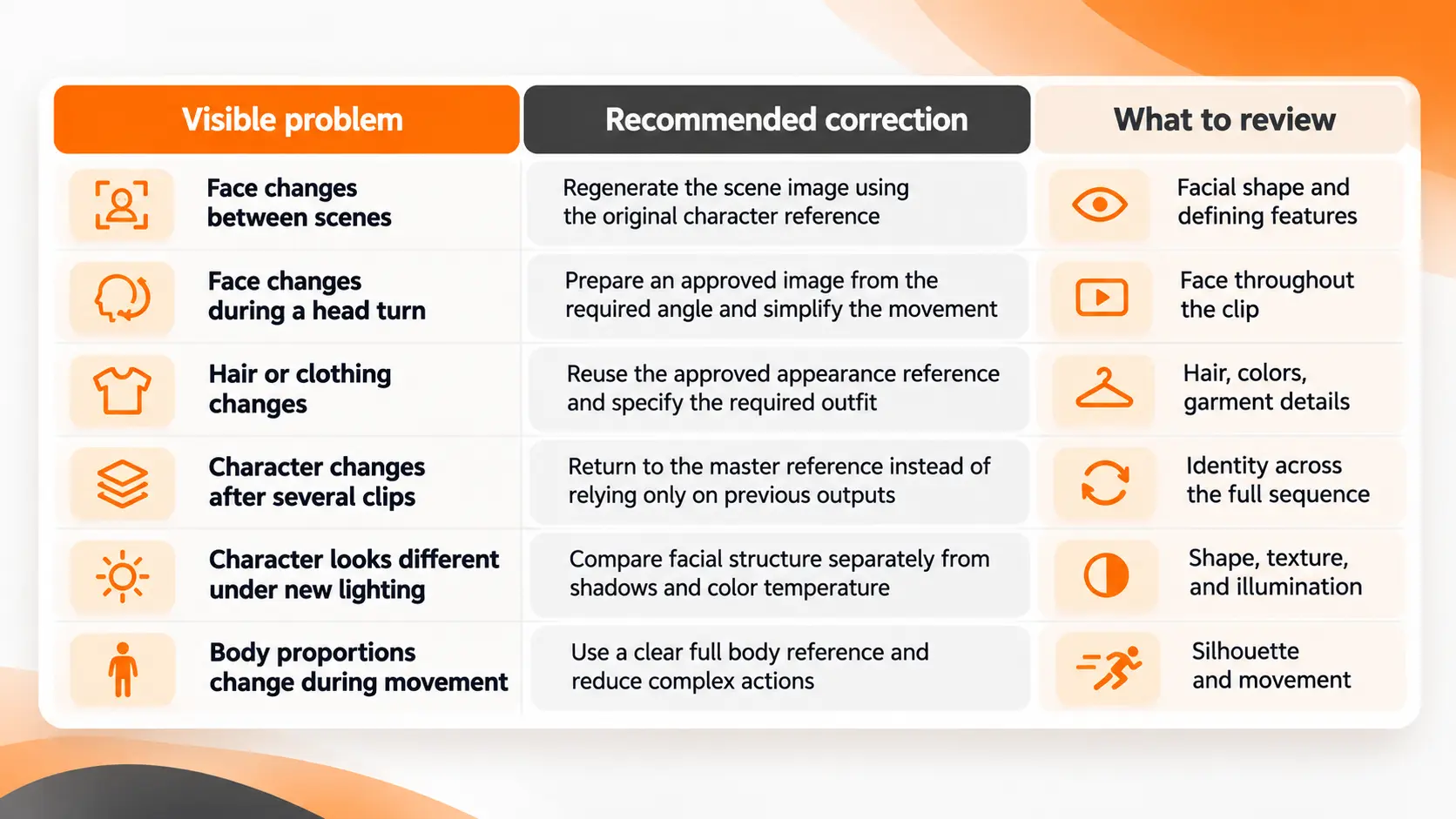
The key is to repair the earliest incorrect stage rather than repeatedly generating videos from an unapproved image.
Using Frames From Previous Clips
An accepted frame from the end of one video can serve as the opening image for another clip when the selected model supports that workflow.
This is useful for continuing a movement across two connected shots.
However, the extracted frame represents the character as generated by the previous model output.
If it contains a small facial change, using it as the next reference can carry that change forward.
For a continuous action, I would inspect the shared frame before reusing it.
For a new scene in a different location, I would return to the original identity reference and create a fresh approved starting image.
This distinction helps maintain character continuity without allowing small visual changes to accumulate across an entire project.
Reviewing Character Consistency Before Editing
Before combining the generated clips, I would compare the same character at the beginning, middle, and end of each shot.
The review should focus on details that need to remain unchanged.
Start with the face. Check the eyes, nose, jawline, hairstyle, and distinguishing marks against the master reference.
Then examine body proportions, clothing, and accessories.
Finally, play the complete clips in sequence.
A face can look correct in selected still frames while changing during movement. Watching the full video reveals those transitions.
I would also compare the first and last appearances of the character in the finished sequence. These two moments provide a direct way to judge whether the same recognizable identity has been preserved throughout the story.
For projects with strict visual requirements, select only approved clips and use editing or manual corrections where generation does not preserve a necessary detail.
Character consistency is not established by using the same prompt or choosing the same generator. It is established by maintaining an approved visual identity across the completed footage.
Final Thoughts
AI video character consistency depends on treating a character as a reusable visual asset rather than recreating their appearance for every scene.
The workflow begins with a master reference, continues through approved scene images, and ends with a review of the generated movement.
For short films, branded characters, and recurring video content, this approach provides a clear production method: preserve identity, change the scene, approve the result, and then animate it.
The objective is not to make every frame look identical. It is to keep the character recognizable while allowing natural changes in expression, movement, camera position, and environment.
FAQ
Can I keep two characters consistent in the same AI video?
Yes, supported reference workflows can use multiple character assets in a scene. Prepare a separate approved reference for each character and identify their roles clearly. Their positions and interactions must still be reviewed to detect unwanted changes or blended facial features.
Will using the same seed keep my character's face identical?
No. A fixed random seed can help reproduce aspects of a generation under compatible settings, but it does not guarantee the same character identity across different scenes, inputs, or models. Visual references remain necessary for identity control.
Can I move the same AI character from Runway to Kling?
You can transfer approved character images between platforms that accept the relevant file formats. However, saved reference settings and internal character assets are not automatically transferable. The character must be set up using the destination platform's supported reference workflow.
Can AI keep my character's voice the same too?
Yes, certain platforms provide voice reference or voice binding features. Kling's supported character workflows include voice binding. Visual character consistency and voice consistency require separate controls, so an unchanged face does not automatically produce an unchanged voice.
Can I use a real person's face as my AI character reference?
A real person's photograph can be used only in accordance with applicable rights, consent requirements, and platform rules. Commercial use may require authorization for the person's likeness. A generated video should not be presented as authentic footage of someone performing actions they did not actually perform.
Fatemeh Jahangard
Technology & AI Writer at PinerookFatemeh Jahangard covers AI, emerging technologies, and digital innovation for Pinerook, focusing on how technology shapes startups and industries.
 Seen first.