AI crawler optimization makes website content accessible to the automated systems that discover, retrieve, and process information for AI search. The practical work involves checking crawler permissions, removing server restrictions, making important content available in HTML, and verifying successful requests through server logs.
Within Generative Engine Optimization (GEO), technical accessibility is a necessary foundation. A page can contain excellent information and still remain unavailable to a search crawler because of a firewall rule, an incorrect response, or content that depends entirely on browser rendering.
How to Optimize Your Website for AI Crawlers
The most useful starting point is a single public page that should be accessible to AI search systems.
We examine that page through six checks before expanding the review across the website.
Identify the intended crawler. Determine whether the service uses the bot for search discovery, model training, or a specific user request.
Check robots.txt permissions. Confirm that the relevant crawler can access the page and its important resources.
Inspect the server response. Check the HTTP status, redirects, and restrictions applied by hosting or security services.
Review the returned HTML. Confirm that the page contains the information the crawler is expected to retrieve.
Check page discovery. Verify that important pages have accessible internal links and appropriate indexing settings.
Validate actual crawler requests. Inspect server or CDN logs and verify the identity of the requesting bot.
The order matters.
If robots.txt blocks the intended crawler, there is little value in investigating content structure first. If the crawler is permitted but the firewall rejects its requests, changing the article will not solve the access problem.
The goal is to establish exactly where access fails and correct that specific restriction.
AI Search Crawlers and Their Functions
AI services use different automated systems for different purposes. Treating all of them as one category can lead to incorrect access decisions.
Search Crawlers and Training Crawlers
OpenAI separates its search crawler from GPTBot, which collects content that may be used to develop its foundation models.
Its search crawler supports the discovery of websites for ChatGPT Search. GPTBot serves a different purpose.
A website owner can permit OpenAI's search crawler while restricting GPTBot.
Anthropic makes a similar distinction. ClaudeBot is associated with model development, while its separate search crawler supports web search. Anthropic also operates a fetcher for requests initiated by Claude users.
PerplexityBot is designed to discover content for Perplexity search results and is not used to collect material for foundation model training.
These distinctions matter when configuring robots.txt.
A policy intended to restrict model training should not automatically prevent access by search crawlers if the business wants its public pages available in AI search.
Googlebot and Google AI Search
Google AI Overviews and AI Mode use Google's existing search infrastructure.
Googlebot remains the relevant crawler for Google Search.
Google also provides an Extended control for certain uses of website content in Gemini and related products. This is a product control rather than a separate crawler that visits pages under its own identity.
Restricting Google's Extended control does not remove a website from Google Search.
For AI Overviews and AI Mode, the relevant technical requirements remain those of Google Search, including indexing eligibility and the ability to display a search snippet.
User Initiated Fetchers
Some AI assistants retrieve webpages in response to a specific user request rather than through scheduled search crawling.
OpenAI, Anthropic, and Perplexity document separate mechanisms for these requests.
Their treatment of robots.txt differs from that of automated search crawlers. OpenAI and Perplexity explicitly explain that certain user initiated requests are not governed by the same automatic crawling rules.
This is why crawler names must be matched to their actual function before applying restrictions.
For technical configuration, use the exact user agent tokens published in each provider's documentation.
Configuring Robots.txt for AI Crawlers
Robots.txt is the first configuration file to inspect when a search crawler cannot access a public page.
It communicates which paths compliant automated crawlers are permitted to request.
The file belongs at the root of the relevant website host. Rules for one host do not automatically apply to another host or subdomain.
Reviewing Existing Permissions
Start by identifying the rules affecting the selected crawler.
Check whether the crawler has its own group of instructions or falls under a general rule.
Then examine the path being tested.
A site might permit its article directory while restricting product documentation through a broader directory rule.
The result is an access problem for an important page even though the website appears publicly available.
When a crawler needs access to a specific section, its rules must permit that section according to the crawler's documented robots.txt behavior.
Allowing a crawler in robots.txt does not override a firewall, authentication requirement, or server restriction.
The file expresses a crawling preference. It does not force the server to deliver the requested content.
Separating Search and Training Permissions
We recommend defining the business's intended access policy before editing crawler rules.
For example, a publisher might want its product documentation discoverable through ChatGPT Search while preventing GPTBot from collecting that content for model training.
Those objectives require separate crawler settings.
The same review should consider Anthropic's search and training crawlers and the individual controls documented by other providers.
Avoid copying a general robots.txt configuration that blocks every AI related bot without distinguishing its purpose.
Such a configuration can prevent the exact search discovery the website is trying to support.
Robots.txt and Indexing Controls
Crawling permission and indexing permission are not the same.
Robots.txt manages crawler access. A noindex directive instructs supporting search engines not to include a page in their indexes.
For Google, a page blocked through robots.txt can still have its URL discovered from other sources. If the crawler cannot access the page, it also cannot read a noindex directive placed inside that page.
A page intended for Google AI Overviews or AI Mode must meet Google's indexing and snippet eligibility requirements.
Before changing any restriction, determine whether the business wants to prevent crawling, prevent indexing, limit snippets, or restrict training.
Each objective requires the appropriate control.
Fixing CDN and Firewall Restrictions
A correctly configured robots.txt file does not establish that an AI crawler can reach the website.
Content delivery networks, web application firewalls, and hosting security systems can reject requests before they reach the application.
This is particularly important when a website uses aggressive bot protection.
HTTP Access Errors
A crawler receiving HTTP 403 has been refused access to the requested resource.
The next step is to identify which system returned the refusal.
Check security event records at the CDN or firewall before changing the application itself.
If the request was blocked by a security rule, inspect the rule and the identity of the requester.
HTTP 429 indicates that requests have exceeded a rate limit.
Rather than disabling rate limiting across the website, review the affected endpoint, request frequency, and the relevant crawler's documented behavior.
HTTP 500 and related server errors require a different investigation. They indicate that the server or an intermediary could not complete the request successfully.
These problems should be resolved at their source rather than treated as robots.txt issues.
Verified Bot Access
A user agent string alone is not reliable proof that a request comes from a legitimate AI crawler.
An unrelated requester can send a header containing the name of a recognized bot.
OpenAI and Perplexity publish IP ranges for their crawlers. These records can be used alongside the relevant provider's verification guidance.
Cloudflare also provides verified bot identification and controls for AI crawlers.
When allowing trusted bots through a security system, match the request to the provider's verified identity rather than accepting every request claiming to be that bot.
This preserves the website's security protections while addressing legitimate crawling requirements.
Making JavaScript Content Accessible
A crawler can receive HTTP 200 and still fail to obtain the information that makes a page useful.
This occurs when the server returns an HTML document containing little more than an application container and JavaScript references.
The visible article or product information appears only after a browser executes additional code.
Google has a rendering system capable of processing JavaScript. Other AI search crawlers do not necessarily render pages in the same way.
Inspecting the Initial HTML
Open the page source or retrieve the server response without relying on the browser's rendered view.
Look for the primary heading, essential body text, product specifications, and internal links.
If these elements are missing from the initial HTML, determine how the website generates them.
A page can look complete in a browser while providing very little information to a crawler that does not execute its scripts.
The solution is to make essential public information available in a response the intended crawler can process.
Server Rendering and Static Content
Server rendering and static generation are practical ways to deliver meaningful HTML.
For a product page, this includes the product name, description, supported features, and important specifications.
For an article, the main content and relevant links should be available without requiring an interactive browser session.
Interactive features can remain in JavaScript. The requirement is not to eliminate JavaScript but to avoid making essential public information dependent on it.
We also check content hidden behind tabs, interactive controls, or API calls.
If the information exists only after a visitor clicks a control, a crawler that does not perform that interaction cannot be expected to retrieve it.
AI Crawler Access Troubleshooting
A technical audit becomes more useful when each observed problem leads to a specific test and corrective action.
The following table connects common access failures with their likely causes and practical resolutions.
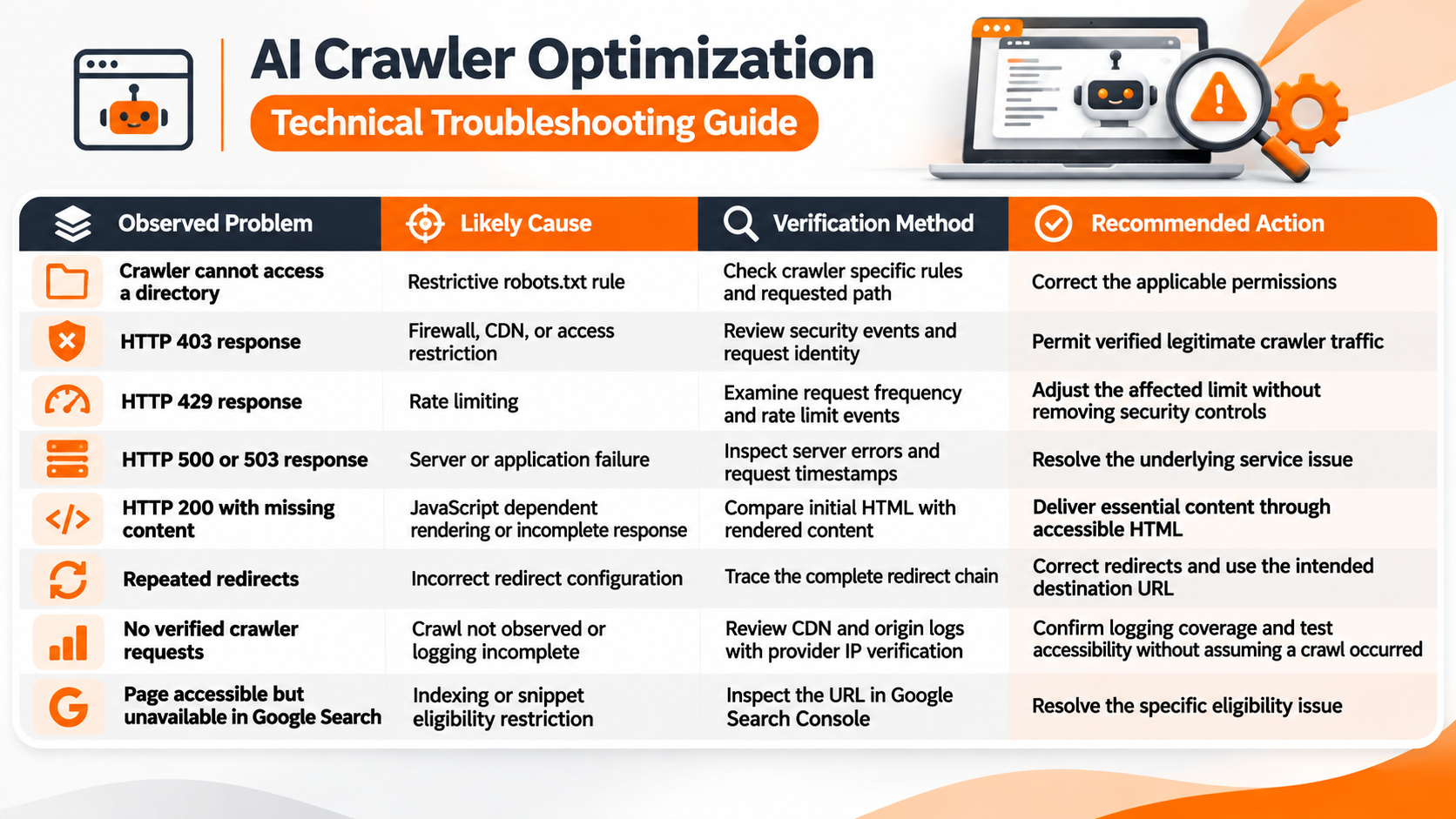
A successful configuration test does not establish that a crawler has visited the page.
Likewise, a request recorded in a server log does not prove the crawler received the complete content.
These are separate checks, and both matter when validating the result.
Improving Page Discovery
After access and rendering are confirmed, the next task is to ensure important pages can be discovered through the website's structure.
Internal Links and Site Architecture
Public pages should be connected through accessible navigation and relevant internal links.
A product documentation page with no internal links is harder to discover through normal website navigation than a page connected to the relevant product and support sections.
Important links should exist in the HTML and point to functional destinations.
Avoid depending entirely on search forms, interactive filters, or scripts to reveal pages intended for public discovery.
A clear hierarchy also helps users understand how related resources fit together.
XML Sitemaps and Canonical URLs
An XML sitemap provides participating search engines with a list of important URLs.
For Google, it is a supported discovery mechanism.
However, sitemap support and behavior differ among AI crawler operators. A sitemap should not be treated as proof that every AI platform has discovered or indexed its contents.
Keep the sitemap consistent with the website's intended public pages.
Also check canonical signals when several URLs provide substantially the same content.
For example, a product page accessible through multiple tracking parameters should identify the intended primary URL where the relevant search engine supports canonicalization.
Canonical elements are not access permissions, and independent AI crawlers are not guaranteed to interpret them identically.
The objective is to provide clear, stable destinations while avoiding unnecessary duplication.
Verifying AI Crawler Access in Server Logs
Server logs provide evidence that cannot be obtained from a visual website inspection.
They show requests received by the logging system, including the requested URL, response status, timestamp, and available identifying information.
For websites using a CDN, both edge level records and origin logs may be relevant.
A request blocked at the CDN will not appear as a completed request in the origin server's access log.
Identifying Legitimate Crawlers
We start by filtering recorded requests for the crawler being investigated.
Then we compare the source IP and other available signals with the provider's published verification method.
This separates verified provider traffic from requests that merely claim a crawler identity.
For every relevant request, examine:
The exact URL requested
The verified crawler identity
The request timestamp
The HTTP response status
The redirect destination, if applicable
The response size and available error details
The response size provides useful context but is not proof of complete content delivery.
A response with a small body could be an empty document, an error message, or a valid small resource.
The response itself must be inspected when completeness is in doubt.
Confirming Successful Retrieval
A reliable verification combines three observations.
First, the configured access rules permit the intended request.
Second, an equivalent request receives the expected response and essential content.
Third, actual log records confirm that the intended crawler has accessed the relevant URL.
These checks establish progressively stronger evidence of technical accessibility.
They do not guarantee that the crawler will index the content, retrieve it for a future question, or cite it in an AI answer.
That distinction should remain clear in every technical report.
Managing Crawler Access After Deployment
Crawler optimization does not end when a blocked request becomes successful.
Security settings, application deployments, and CDN configuration changes can alter access to previously available pages.
We treat crawler access as part of ongoing website operations.
Controlled Configuration Changes
Begin with a small group of important public URLs.
Document the original permissions and server responses before making changes.
Then apply the required adjustment and confirm that it resolves the targeted issue.
For example, when a verified search crawler is blocked by a specific firewall rule, the appropriate change is a narrowly scoped permission for that legitimate traffic.
Disabling bot protection for the entire website creates unnecessary security exposure.
The same principle applies to rendering changes. Improve the delivery of public content without exposing private application data or authenticated resources.
Monitoring After Updates
After deployments or security policy changes, review whether important pages remain accessible.
A useful operational record contains the affected crawler, URL, observed problem, corrective action, and verification result.
This enables technical teams to distinguish a new incident from a previously resolved configuration issue.
When a crawler has not appeared in the logs, report that no verified visit was observed within the examined period.
Absence from the available logs does not establish that the provider is unable to access the site.
Technical Accessibility and AI Search Visibility
AI crawler optimization addresses a specific problem: whether the systems responsible for search discovery and retrieval can obtain the information a website intends to publish.
It does not determine which sources an AI platform will select in its answers.
Google explicitly states that its AI search experiences do not require special AI markup or additional technical optimization beyond established Search requirements.
For other providers, the documented crawler controls and access mechanisms provide the appropriate starting point.
We therefore judge technical optimization by evidence that a targeted restriction was identified and resolved.
The most valuable outcome is a public page that the intended crawler can request, retrieve, and process without encountering an avoidable technical barrier.
Reliable crawler access does not guarantee AI search visibility, but inaccessible content cannot fulfill its intended role as a directly retrieved source.
FAQ
Can we test AI crawler access without having server logs?
Yes. Robots.txt rules, HTTP responses, firewall configuration, and returned HTML can be inspected without server logs. These tests establish aspects of technical accessibility. They cannot confirm that a particular provider's crawler has actually visited the page.
What if our website uses different content for mobile and desktop visitors?
Both versions should be tested when the server delivers different content based on device or request characteristics. Important public information should remain accessible in the responses served to the intended crawler. Differences between device versions should not remove essential content or navigation.
Can AI crawlers still access our PDF files if the article page is blocked?
A PDF is an independently accessible resource. Blocking the page that links to it does not automatically block the PDF URL. Access to the PDF must be controlled through its own applicable restrictions, including server permissions and supported crawler directives.
Can we share crawler logs with an outside SEO agency?
Yes, with appropriate access controls. Provide only the fields needed for the technical investigation and remove unnecessary personal or confidential information. Limited exports or restricted analysis access are preferable to unrestricted access to complete production logs.
What if we don't want AI crawlers accessing our staging website?
Protect the staging environment with authentication or equivalent server access controls. Robots.txt is not a security mechanism and cannot prevent unauthorized access to sensitive content. Staging restrictions should be configured independently from the public production website.

Fatemeh Jahangard
Technology & AI Writer at PinerookFatemeh Jahangard covers AI, emerging technologies, and digital innovation for Pinerook, focusing on how technology shapes startups and industries.
 Seen first.