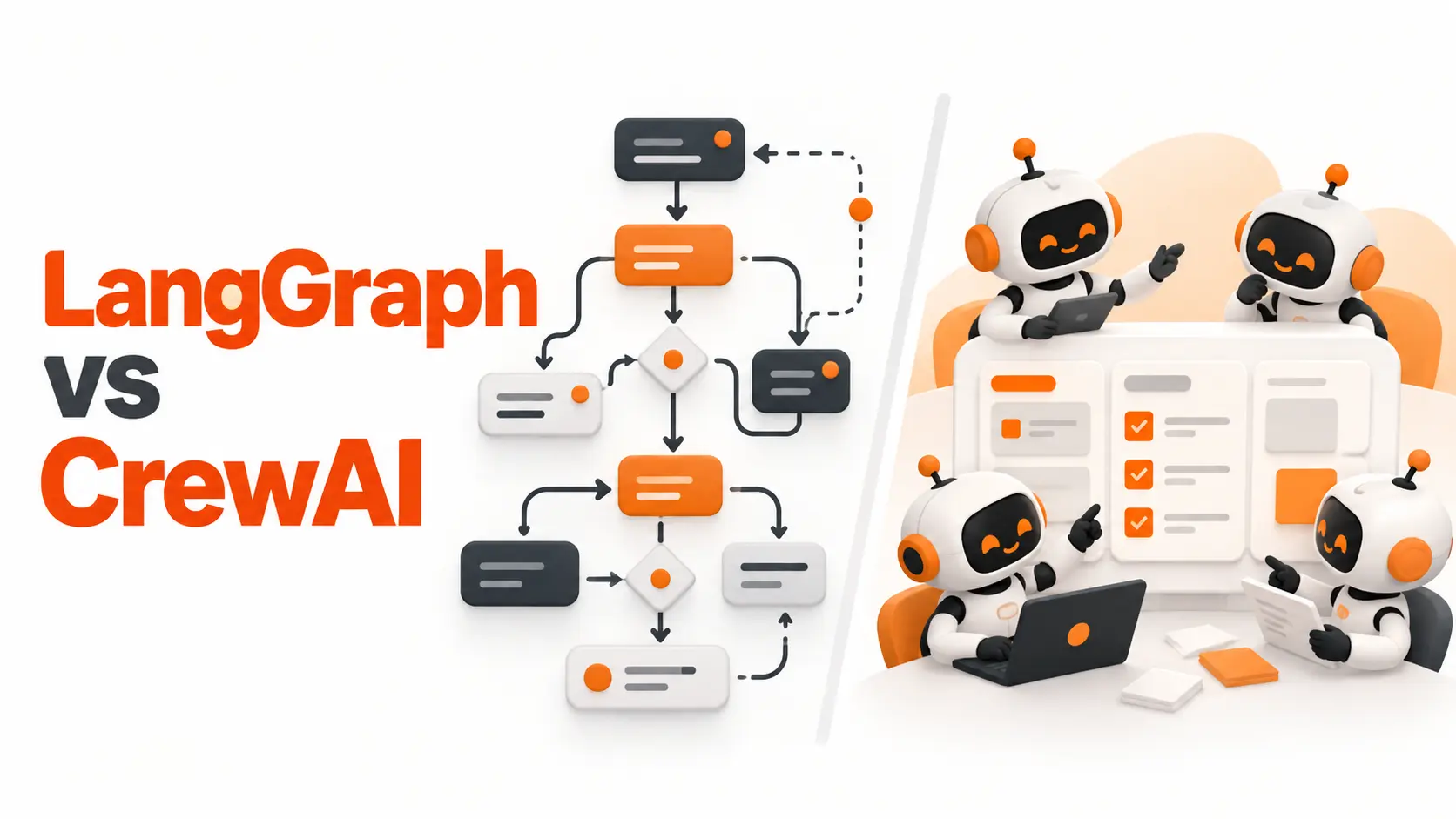
LangGraph gives developers direct control over how AI agents execute tasks, share state, and move between workflow steps. CrewAI approaches the same problem through specialized agents that collaborate on assigned responsibilities, with Flows providing structured execution control.
For a startup building its first multi-agent application, I would choose CrewAI when the work naturally divides into roles such as researcher, analyst, and planner. I would lean toward LangGraph when application behavior depends on tightly controlled state transitions, complex routing, and precise recovery requirements.
But the comparison goes deeper than simplicity versus control. Both frameworks now support production workflows, persistence, and human intervention. The real decision comes down to the architecture your application needs.
LangGraph vs CrewAI: Key Differences
I wouldn't choose either framework based on GitHub popularity or the number of available examples. I'd start with the way each one represents work and how much control the development team needs over execution.
Here's the LangGraph vs CrewAI comparison I'd use before selecting a framework for an AI product.
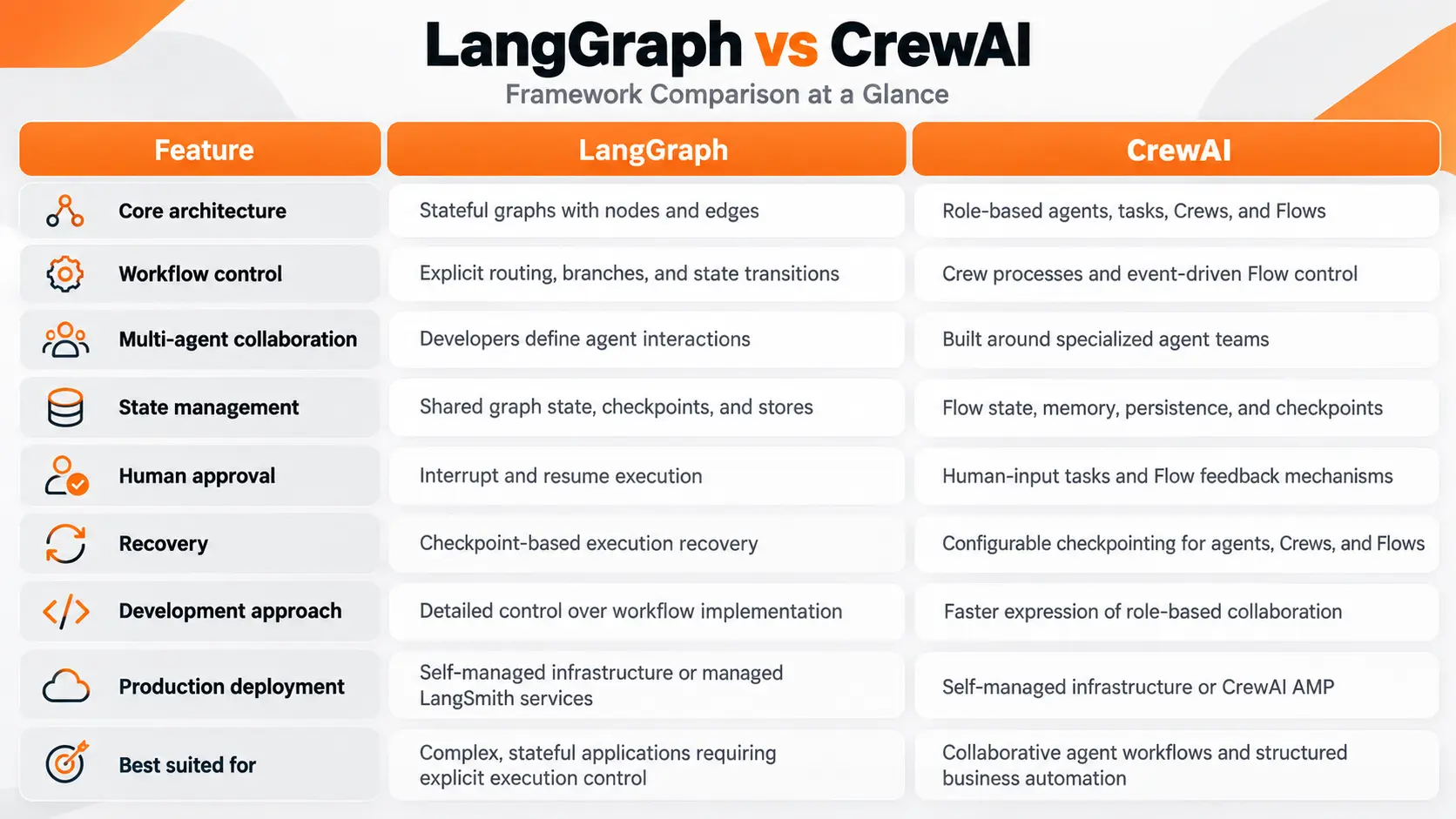
The biggest difference isn't whether either framework can run multiple agents. Both can.
It's whether you want to design the execution graph first or define the responsibilities of an agent team first.
That distinction becomes more important as the application grows.
LangGraph Architecture: State and Execution Control
LangGraph is built around an executable graph. Each node performs a defined operation, while edges determine which step runs next.
The application maintains state that nodes can read and update.
Consider a customer-support system that receives a refund request. The application needs to identify the customer, check transaction information, evaluate refund eligibility, and request approval when necessary.
In LangGraph, I would represent these operations as separate nodes.
The routing logic would determine whether the request can proceed, needs additional information, or must wait for a human decision.
This structure makes the workflow visible in code.
Explicit Routing and Shared State
One advantage of LangGraph is the ability to control transitions through conditional edges and application logic.
An agent can classify a customer request, but the application can use a defined rule to decide what happens next.
For example, the model can identify a billing issue while the application independently verifies whether the transaction qualifies for a refund.
That separation matters when business decisions require more than a model-generated recommendation.
State is equally important. LangGraph lets developers define the information that must remain available throughout execution, including intermediate results, approval decisions, and identifiers needed by later steps.
Its Graph API supports structured workflows, while its Functional API provides another way to build durable applications without expressing every operation as a graph node.
I would favor this level of control for applications where execution order and state transitions are central to the product.
CrewAI Architecture: Agents, Tasks, and Flows
CrewAI starts with a different abstraction.
Instead of defining a graph as the primary structure, developers can create agents with specific roles, goals, and responsibilities.
A product research application might include three agents:
Research Agent: Collects and organizes relevant product information.
Analysis Agent: Evaluates the findings against defined criteria.
Planning Agent: Converts the analysis into actionable recommendations.
Tasks describe what each agent must accomplish. A Crew coordinates their work through a process.
CrewAI supports sequential execution and hierarchical execution, where a manager coordinates task delegation.
This model is appealing when an application resembles a team of specialists working toward a shared result.
Structured Execution with CrewAI Flows
An important part of this comparison is CrewAI Flows.
CrewAI is not limited to assigning tasks to agents and letting them collaborate.
Flows provide event-driven execution, shared state, conditional routing, and integration with Crews.
A startup could use a Flow to receive customer information, validate it, launch a specialized Crew, and route the result to a defined destination.
Developers can also use Flow state persistence and configure checkpointing for recovery.
This changes how I would evaluate CrewAI for production.
A simple Crew is well suited to collaborative work. A Flow adds control over the surrounding application.
LangGraph still offers a more direct graph-centered model for specifying execution logic, but CrewAI does not require developers to surrender control over the entire workflow.
LangGraph vs CrewAI in a Real SaaS Application
Let's compare both frameworks using the same product requirement.
Imagine a fictional SaaS company called DeskFlow. It provides customer-support software to small businesses and wants to automate the initial handling of customer tickets.
The application must classify incoming requests, retrieve relevant information, prepare a response, and send sensitive cases to a support manager.
It also needs to preserve enough information to continue work after an interrupted execution.
CrewAI Implementation
For CrewAI, I would begin by assigning responsibilities.
A classification agent identifies the type of ticket. A knowledge agent retrieves relevant information. A response agent prepares the customer reply.
A Crew can coordinate those responsibilities and produce a structured result.
Next, I would use a Flow to control the application around the Crew.
The Flow receives the ticket, checks its required fields, starts the appropriate processing steps, and handles approval before the response is delivered.
This division keeps the agent team's collaborative work separate from the application's operational decisions.
I would choose this structure if DeskFlow's main requirement were coordinating specialized agents while keeping the surrounding business process manageable.
LangGraph Implementation
With LangGraph, I would start by identifying the application's state and possible execution paths.
The graph would include nodes for classification, customer verification, document retrieval, response drafting, and approval.
Conditional routing would determine which nodes execute.
The application could interrupt execution before a sensitive action, preserve its state, and continue after the manager responds.
Each node would have a defined responsibility, and the workflow would specify how execution proceeds under different conditions.
I would choose this structure if DeskFlow needed detailed control over multiple branching paths, inspection of intermediate state, and tightly managed execution recovery.
The Architectural Difference
Both implementations can produce the same customer-facing result.
The difference appears in how developers describe and maintain the process.
CrewAI makes the team of agents a central part of the design. LangGraph makes the executable workflow and its state central to the design.
Neither approach automatically produces more accurate AI responses.
Accuracy still depends on the model, instructions, available information, validation, and evaluation process.
State Management and Execution Recovery
State management is one of the most important considerations when choosing a framework for a real product.
An AI application running a short research task has different requirements from a customer workflow that pauses for approval or performs work across several services.
LangGraph provides checkpointers for saving graph state within execution threads. It also supports stores for information that must persist across threads.
These mechanisms support interrupted workflows, state inspection, and recovery.
CrewAI provides Flow state management, persistence, memory capabilities, and configurable checkpointing.
Its checkpointing system can preserve execution progress and restore work from recorded checkpoints.
This means describing CrewAI as a framework without execution recovery would be inaccurate.
The more useful distinction is the way those capabilities fit into each framework's design.
LangGraph exposes state transitions as a core part of its graph architecture. CrewAI supports recovery across its agent, Crew, and Flow abstractions.
Recovery Beyond Checkpoints
There is one production requirement I would evaluate separately from either framework's advertised features: external side effects.
Suppose the application successfully sends an email and then crashes before recording that the operation completed.
Restarting from a checkpoint can cause the application to repeat work unless the external action has appropriate safeguards.
For operations such as sending invoices, processing refunds, or creating database records, I would implement idempotency keys or equivalent duplicate-prevention controls.
Checkpointing preserves execution progress. It does not automatically make every external business operation safe to repeat.
That distinction matters more to production reliability than the framework's feature count.
LangGraph vs CrewAI Performance and Cost
There is no reliable universal winner in LangGraph vs CrewAI performance.
Execution time and API cost depend on workflow design, model selection, tool calls, state persistence, and the number of agent interactions.
A Crew with several agents can generate more model requests than a narrowly defined graph. A LangGraph application can also become expensive if its execution paths repeatedly invoke models or tools.
I would compare them using the same business task, model, input data, and output requirements.
The metrics worth collecting are:
Cost per completed task: Total model, tool, and infrastructure expenses divided by successfully completed requests.
End-to-end latency: Time from receiving an input until the application delivers a usable result.
Task completion rate: Percentage of inputs that produce a valid output under the defined requirements.
Recovery behavior: Amount of work repeated after an interruption and the ability to resume correctly.
Development effort: Engineering time required to implement, test, deploy, and maintain the workflow.
For a startup, development effort deserves particular attention.
A framework that reduces initial implementation time can be valuable for a small team. But if the application requires extensive customization, the time spent adapting the framework can outweigh the initial convenience.
Framework and Deployment Costs
Both LangGraph and CrewAI are available as open-source frameworks. Using their core libraries does not require purchasing a managed deployment subscription.
That does not make a deployed AI system free.
Model API usage, hosting, databases, logging, storage, and external services still contribute to operating costs.
LangSmith provides managed services for tracing, evaluation, and deployment in the LangGraph ecosystem.
CrewAI AMP provides managed deployment, monitoring, and operational tooling for CrewAI applications.
Their commercial offerings have separate pricing considerations.
I would calculate the expected monthly expense from measured usage rather than using framework popularity as a proxy for cost efficiency.
LangGraph vs CrewAI for Production Applications
Both frameworks can be used in production. Choosing between them requires looking at the operational behavior of the actual application.
For an internal research assistant, the product team may prioritize straightforward agent definitions, useful outputs, and limited maintenance.
CrewAI is a strong candidate for that design.
For a transaction-processing assistant that coordinates multiple services, waits for approvals, and must expose detailed state transitions, LangGraph offers an architectural model that maps directly to those requirements.
CrewAI Flows can also support structured production applications, so the choice is not a binary distinction between prototype and production.
Human Approval and Monitoring
LangGraph supports interrupting execution and resuming with additional input. This is valuable when a workflow needs human decisions at specific points.
CrewAI provides human-feedback capabilities in its workflows and supports approval-oriented interactions.
In both cases, I would keep authorization decisions within the application rather than relying solely on an agent's interpretation of a prompt.
Monitoring is another separate responsibility.
LangGraph integrates with LangSmith for tracing and evaluation. CrewAI provides tracing capabilities and integrations with observability platforms.
For either framework, I would define what needs to be recorded before deployment: input identifiers, execution paths, model calls, tool results, failures, and approval events.
That information helps a development team diagnose failures and evaluate whether the system is meeting its business requirements.
Choosing Between LangGraph and CrewAI for a Startup
The strongest way to make this decision is to examine the product's workflow before choosing the technology.
If the application needs specialized agents to research information, analyze results, and prepare recommendations, I would start by evaluating CrewAI.
Its role-based structure makes responsibilities clear, and Flows provide a way to connect those agents to a broader application.
If the product requires detailed branching, controlled state transitions, and carefully managed execution paths, I would evaluate LangGraph first.
Its lower-level architecture places more implementation responsibility on developers, but it gives them direct control over how workflow steps interact.
For a small product that only makes a model call and retrieves information from a database, I would also question whether a multi-agent framework is necessary at all.
Using a standard API integration can be the simpler engineering decision.
The purpose of AI Agent Orchestration is to coordinate tasks and responsibilities reliably. The framework should match those responsibilities rather than determine how the product must operate.
My selection criteria would be straightforward: choose the framework whose abstractions make the application's requirements easier to implement, test, and maintain.
Final Verdict
For developers choosing between LangGraph and CrewAI in 2026, I would recommend CrewAI for applications centered on collaboration between specialized agents and LangGraph for applications centered on explicit stateful execution and detailed workflow control.
CrewAI's Flows, persistence, and checkpointing capabilities make it a credible option beyond introductory projects. LangGraph's graph-based architecture gives developers a direct way to define and inspect complex execution behavior.
Neither framework guarantees lower costs, higher output quality, or better production reliability by itself.
For a startup, the better framework is the one that meets the product's requirements with fewer unnecessary dependencies and a manageable maintenance burden.
FAQ
Can I move my CrewAI project to LangGraph later without starting over?
There is no automatic one-to-one migration between the frameworks. Agent instructions, tool integrations, and application-level business logic can be reused where their interfaces are compatible. Crew definitions and Flow control logic must be adapted to LangGraph's execution model. Separating business logic from framework-specific components reduces migration effort.
Can I use LangGraph and CrewAI together in one application?
Yes. A LangGraph node can invoke a CrewAI workflow through application code, and a CrewAI Flow can call an independently implemented graph. Developers must define how inputs, outputs, errors, and execution state move between the two systems. Using both introduces integration and monitoring responsibilities.
Do I need LangChain installed to work with LangGraph?
LangGraph can be used independently of the higher-level LangChain framework. It relies on core components within the LangChain ecosystem, but developers are not required to build their applications around LangChain's agent abstractions. LangChain integrations can be added when useful.
Can I build with either framework using local AI models?
Yes. Both frameworks support model integrations that can work with locally hosted inference services. Compatibility depends on the selected provider integration and the model's capabilities, including tool calling and structured output support. Local inference shifts model hosting responsibilities to your own infrastructure.
Can I use CrewAI or LangGraph in a TypeScript application?
LangGraph has an official JavaScript and TypeScript implementation. CrewAI's core framework is Python-based. A TypeScript application can communicate with a Python CrewAI backend through an API, while LangGraph's JavaScript implementation allows the agent workflow itself to run in a supported JavaScript environment.

Fatemeh Jahangard
Technology & AI Writer at PinerookFatemeh Jahangard covers AI, emerging technologies, and digital innovation for Pinerook, focusing on how technology shapes startups and industries.
 Seen first.