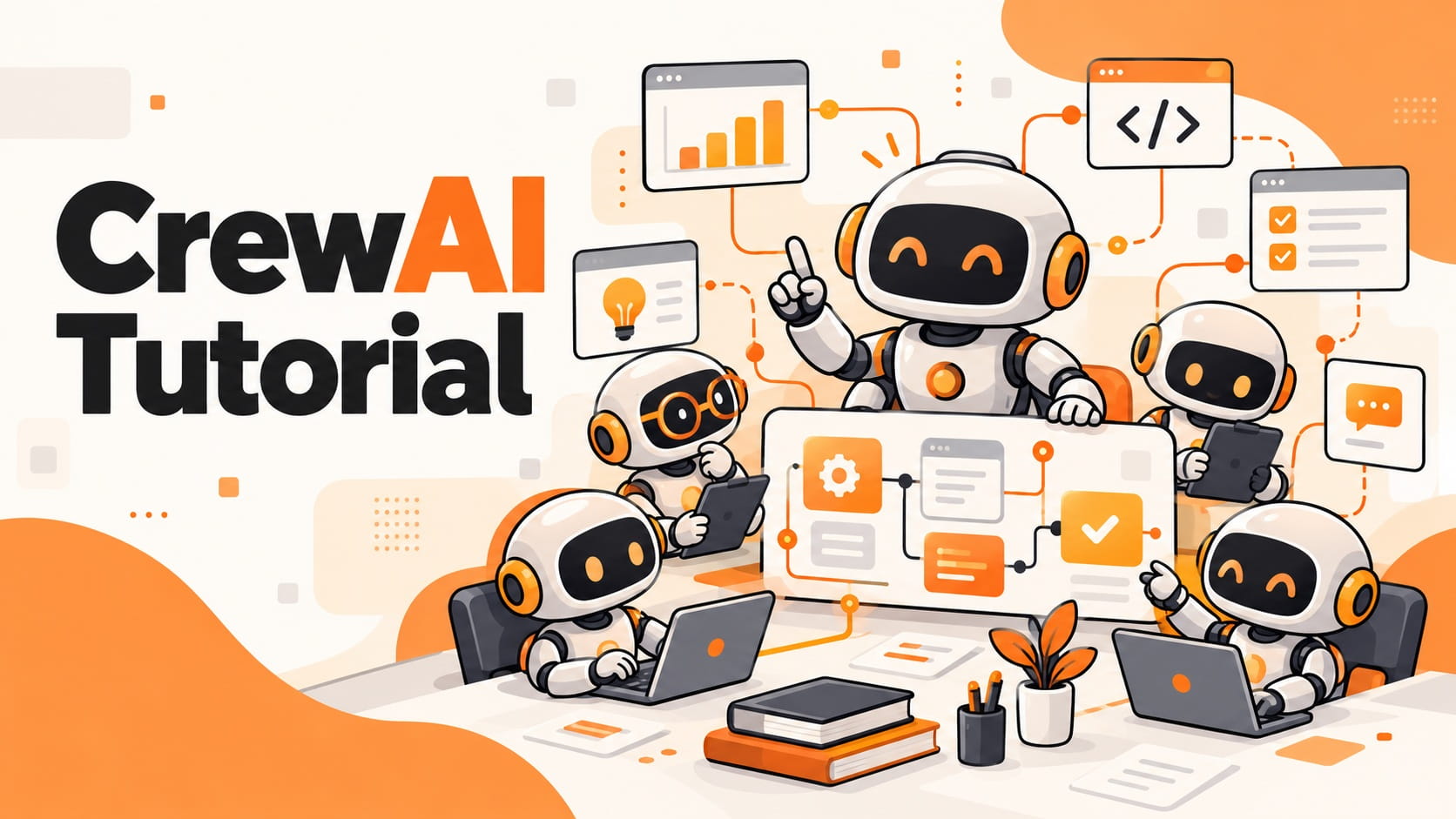
CrewAI allows you to build AI agents that work together on a defined task. Instead of relying on one model to handle an entire workflow, you can assign research, analysis, and planning to separate agents.
In this CrewAI tutorial, I'll walk through building a two-agent system in Python that analyzes startup onboarding data and turns it into an improvement plan.
We'll go from installation to a working project that produces a Markdown report. You'll also see how to pass information between agents and evaluate whether their recommendations are useful.
Build a Startup Research Team with CrewAI
Let's use a problem that a SaaS startup could face during its early growth stage.
Imagine a company called QueuePilot. It sells a shared customer-support inbox to small teams. People are signing up for trials, but the product team has noticed that users aren't completing important setup steps.
The team has a few data points but hasn't decided what to improve first.
We'll build two agents to help organize that decision.
Agent 1: Product Researcher
Reviews onboarding data, identifies problems supported by the evidence, and separates observations from assumptions.
Agent 2: Product Planner
Receives the research findings and proposes two improvements the startup can test without building new features.
The workflow is straightforward:
Product Brief → Research Agent → Planning Agent → Onboarding Report
This is a useful first CrewAI project because it gives each agent a distinct responsibility and produces an output that a real product team could review.
Step 1: Install CrewAI and Set Up Python
For this CrewAI Python tutorial, I'll use Python 3.12, the uv package manager, and an OpenAI API key.
CrewAI supports Python 3.10 through 3.13.
After installing uv, open your terminal and run:
uv init crewai-product-lab --python 3.12
cd crewai-product-lab
uv add "crewai[openai]" python-dotenv
This creates a Python project and installs the dependencies.
Next, create a file named .env in the project directory:
OPENAI_API_KEY=your_api_key_here
Replace the placeholder with your actual key.
For this example, I'll use gpt-4o-mini. API calls are billed separately from ChatGPT subscriptions, so make sure your API account is configured before running the project.
Add .env to .gitignore to keep your credentials out of version control.
Step 2: Create the AI Agents and Tasks
Open main.py and replace its contents with the following Python code.
import os
from dotenv import load_dotenv
from crewai import Agent, Task, Crew, Process, LLM
load_dotenv()
if not os.getenv("OPENAI_API_KEY"):
raise RuntimeError("Set OPENAI_API_KEY in .env")
model = LLM(model="openai/gpt-4o-mini")
researcher = Agent(
role="SaaS Product Researcher",
goal="Identify onboarding problems supported by data",
backstory=(
"You analyze product metrics carefully, "
"separating evidence from assumptions."
),
llm=model,
allow_delegation=False,
verbose=True,
)
planner = Agent(
role="Startup Product Planner",
goal="Turn onboarding findings into testable actions",
backstory=(
"You design practical experiments for "
"small product teams with limited resources."
),
llm=model,
allow_delegation=False,
verbose=True,
)
research_task = Task(
description=(
"Analyze this fictional SaaS onboarding brief:\n"
"{brief}\n\n"
"Identify the two strongest signals of friction. "
"Use only the supplied data. "
"Separate observations from unverified causes."
),
expected_output=(
"Two evidence-backed observations, "
"their supporting numbers, and information "
"that still needs verification."
),
agent=researcher,
)
planning_task = Task(
description=(
"Use the research findings to propose two "
"onboarding experiments. Respect the product "
"team's constraints. For each experiment, "
"include an action, a success metric, and "
"an assumption requiring validation. "
"Do not invent performance improvements."
),
expected_output=(
"A concise Markdown report with two "
"onboarding experiments, measurable success "
"criteria, and outstanding assumptions."
),
agent=planner,
context=[research_task],
output_file="output/onboarding-plan.md",
markdown=True,
)
crew = Crew(
agents=[researcher, planner],
tasks=[research_task, planning_task],
process=Process.sequential,
verbose=True,
)
brief = """
Product: QueuePilot, a SaaS support inbox.
Target customers: Teams with 5-20 employees.
Fictional trial data:
- 100 new trial accounts were reviewed.
- 30 connected a support inbox within 24 hours.
- 18 invited another teammate.
- In five onboarding calls, three users said
that the initial setup instructions were unclear.
Constraint:
The team can update onboarding emails
and help documentation this sprint.
No new integrations or product features.
"""
result = crew.kickoff(inputs={"brief": brief})
print(result.raw)
The data belongs to a fictional startup and is used only to demonstrate the workflow.
I've kept the first project free of external search tools. The agents have enough information to complete their assignments, and we can check their recommendations against the original brief.
Step 3: Run the CrewAI Project
Run the Python script from your project directory:
uv run python main.py
CrewAI executes the research task first, followed by the planning task.
The final report is saved to:
output/onboarding-plan.md
Open that file after execution.
The report should contain two onboarding experiments, a success metric for each, and assumptions that need validation.
You now have a basic multi-agent workflow that turns input data into a document for a product team.
Review the Output Against Startup Metrics
Getting a report isn't enough. The next step is checking whether it makes sense for the startup.
Our fictional company has two measurable onboarding problems: low inbox connection and low teammate invitation rates.
An appropriate report should connect its recommendations to those observations without claiming that the data proves why users dropped out.
Here's what I would look for when reviewing the output:
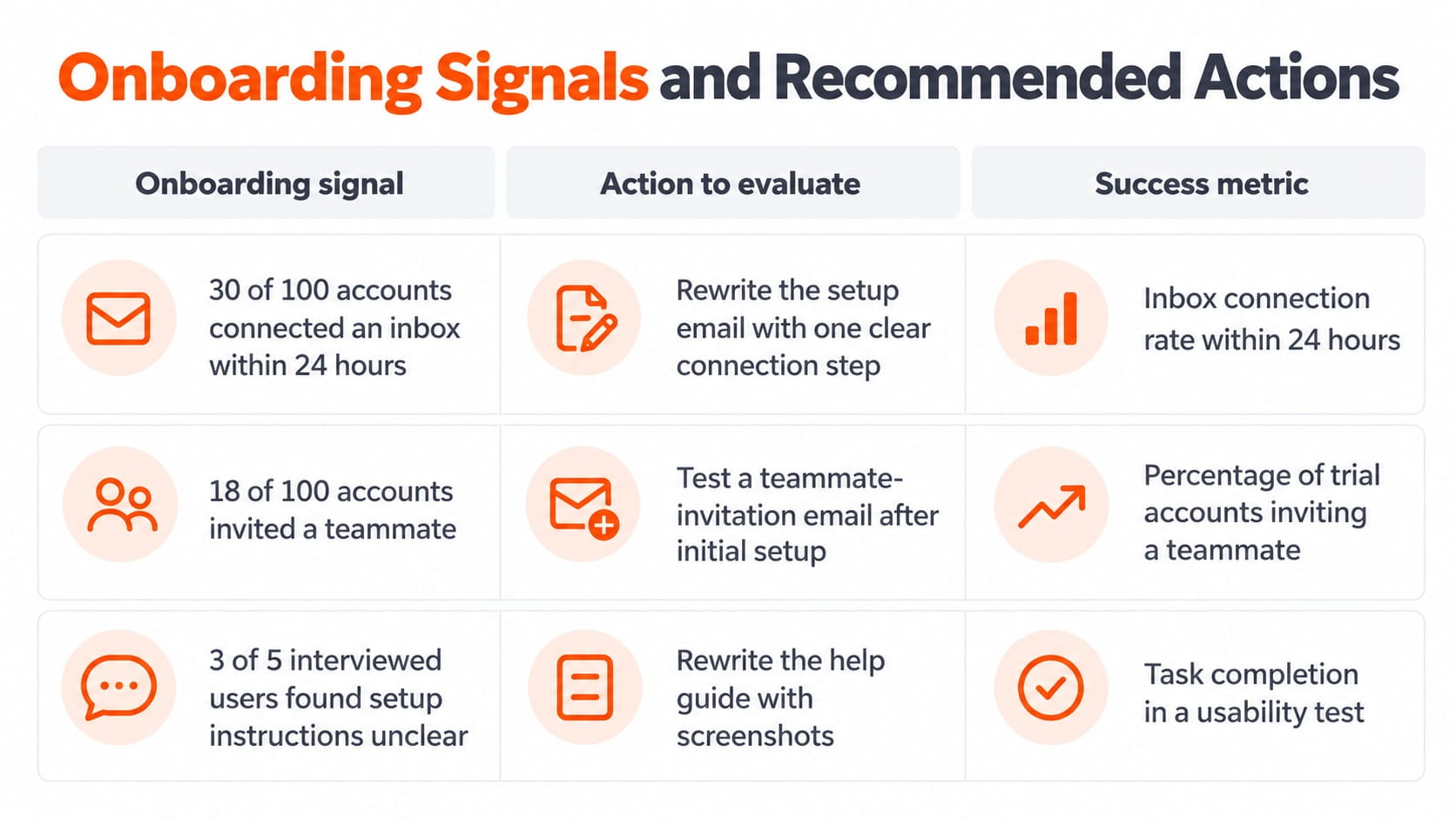
These are proposed experiments, not measured improvements.
That distinction matters. The first agent can identify evidence, while the second agent can recommend an action. Neither agent can establish that the action will increase activation without a real test.
The final report should also respect the startup's resource constraints. A recommendation to build a new integration wouldn't be useful when the engineering team has already ruled out new development during the current sprint.
This is the standard I'd apply before sharing an agent-generated report with a founder or product manager.
Understand How CrewAI Agents Work Together
With the project running, the important part of the code is easier to explain.
An Agent defines a worker's role and objective. A Task defines the assignment, expected result, and responsible agent. A Crew brings those elements together.
In our example, the researcher identifies onboarding signals. The planner converts those findings into experiments.
The connection is defined by:
context=[research_task]
This gives the planning task access to the research task's output.
We also use:
process=Process.sequential
That instructs CrewAI to execute tasks in the order they're listed.
I prefer this approach for a first multi-agent project because it makes the transfer of information visible. You can inspect what the researcher produced and determine whether the planner actually used it.
It's also a simple introduction to AI Agent Orchestration, where agent responsibilities, execution order, and information flow are coordinated within a larger system.
The important lesson isn't to add more agents. It's to give each agent a responsibility that improves the final result.
Improve Task Instructions for Better Results
The quality of this workflow depends heavily on the instructions assigned to each task.
Consider this instruction:
"Analyze the startup and suggest ways to grow."
It leaves too much undefined. The agent doesn't know which data matters, what resources are available, or how its recommendations will be evaluated.
I would replace it with something more specific:
"Review the supplied onboarding metrics. Identify two problems supported by the data and propose improvements that require no new engineering work. Include a success metric for each recommendation."
This gives the agent four boundaries: the source material, the number of findings, the operational constraint, and the required output.
The expected_output setting in CrewAI reinforces the required format.
However, it doesn't independently guarantee factual accuracy. A model can satisfy the requested format while making an unsupported claim.
For startup applications, I'd keep the research task focused on evidence and the planning task focused on decisions. It's easier to review a recommendation when you can trace it back to its supporting observation.
Expand the Workflow Beyond a Single Report
Once the two-agent project works, the next improvement is connecting it to an actual product workflow.
For a startup, that could mean receiving onboarding metrics from an internal database, examining customer feedback, or sending the resulting plan to a product management system.
CrewAI agents can use external tools and APIs, but access should match their responsibilities.
For example, a research agent could receive read-only access to an analytics service. A planning agent would receive the resulting analysis rather than full access to customer records.
I'd also separate recommendations from execution. An agent that suggests changing onboarding emails does not need permission to send those emails.
For more complex applications, CrewAI provides Flows alongside Crews.
A Crew handles collaboration between agents. A Flow manages application state and controls execution between steps.
For instance, a startup could use a Flow to receive metrics, run the research crew, validate the output, request a product manager's approval, and then save the approved plan.
That provides more control than asking agents to manage every part of the business process themselves.
Structure CrewAI Projects for a Growing Team
The example above defines agents and tasks directly in Python. This is a supported way to use CrewAI and keeps the first project easy to understand.
For larger projects, CrewAI's current CLI also supports a JSON-first structure.
New crew projects created with crewai create crew use agents/*.jsonc for agent definitions and crew.jsonc for tasks and crew settings.
This separates the workflow configuration from application code.
I would move to that structure when multiple developers need to maintain agent instructions, add tools, or manage several workflows.
For a single learning project, keeping everything in main.py makes it easier to see how the pieces connect.
Evaluate CrewAI Before Deploying It in a Startup
A successful local run demonstrates that the workflow can execute. It doesn't establish that the system is ready for customers or internal decision-making.
Before deployment, I would evaluate four things.
Accuracy: Compare each research finding against its source. The agent must distinguish supplied data from interpretations.
Reliability: Run the workflow on several briefs, including incomplete datasets and conflicting constraints. Check whether the output remains usable.
Cost: Measure API token consumption and review the pricing of the selected model. A workflow that runs for every new customer requires a different cost assessment from one executed weekly by a product manager.
Permissions: Limit each agent to the tools and information it needs. Avoid giving an experimental workflow write access to production systems.
These checks are particularly important for small teams. A startup can benefit from automating repetitive analysis, but an incorrect recommendation becomes expensive when it triggers an unnecessary product change.
I would keep a person responsible for approving the resulting experiments until the workflow has demonstrated acceptable performance on real tasks.
Final Thoughts
This CrewAI tutorial demonstrates how to build AI agents with Python, connect their tasks, and turn a startup's onboarding data into a product improvement plan.
The project is intentionally small: two agents, two tasks, one sequential process, and one report.
That is enough to understand how CrewAI works and begin developing more useful applications.
The next step is to replace the fictional brief with a controlled sample of your own product data and evaluate the recommendations against decisions your team would actually make.
For startups, the value of a multi-agent system comes from improving a workflow, not from the number of agents involved.
FAQ
Can I use CrewAI without an OpenAI API key?
Yes. CrewAI supports other model providers, including Anthropic and Google, as well as local models through integrations such as Ollama. Each provider has its own configuration requirements. Local inference removes the need for a hosted model API for that part of the workflow, but your hardware must support the selected model.
Can I connect CrewAI to HubSpot or Notion?
Yes. You can integrate CrewAI with external services using supported tools, APIs, or custom integrations. Authentication and the available operations depend on the service. Restrict access to the specific records and actions required by the agent.
Can I run the same CrewAI system for several products?
Yes. You can execute the same crew with different input data. Each execution should receive the correct product context. For concurrent use, manage request limits, application resources, and isolation between customers.
Can I get JSON instead of a Markdown report?
Yes. CrewAI supports structured task outputs through options such as output_json and output_pydantic, using Pydantic models. This is useful when the result needs to be consumed by a dashboard, database, or another application rather than read as a document.
Can I schedule my CrewAI workflow to run automatically?
Yes. You can trigger your Python application through a scheduler, background job system, or application event. The scheduling system runs the workflow at the required time. Store credentials securely and implement monitoring and retry controls for unattended execution.

Fatemeh Jahangard
Technology & AI Writer at PinerookFatemeh Jahangard covers AI, emerging technologies, and digital innovation for Pinerook, focusing on how technology shapes startups and industries.
 Seen first.