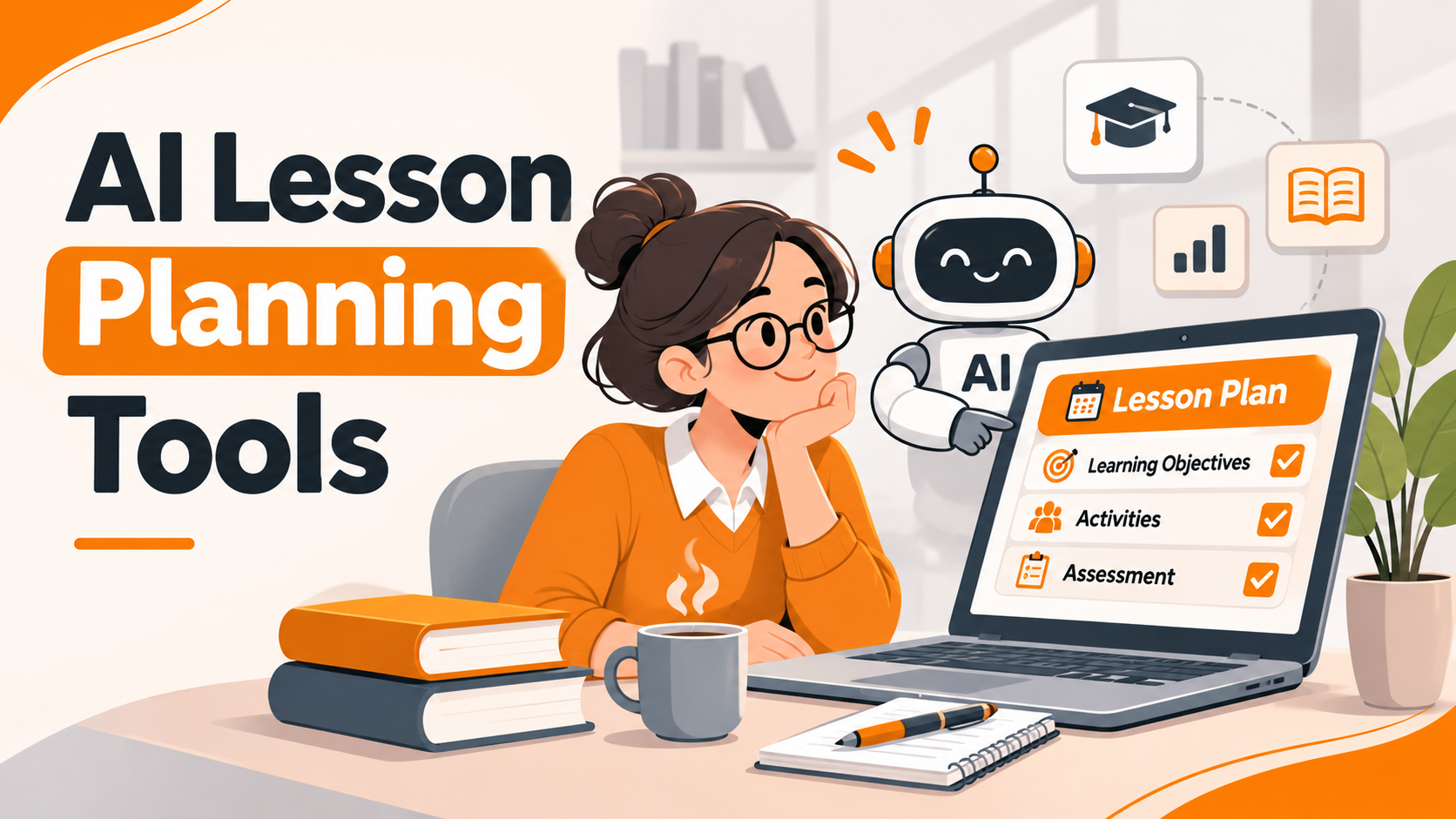
The best AI lesson planning tools do more than turn a topic into a list of classroom activities. MagicSchool helps teachers build structured lessons, Brisk Teaching works directly with existing materials, Eduaide focuses on instructional design, and Diffit adapts resources for different learning levels. Curipod, Khanmigo, and ChatGPT for Teachers offer further options for interactive teaching, curriculum support, and flexible planning.
The practical value of AI in Education becomes clear during lesson preparation. Generating an outline is easy. Creating a lesson that fits a specific class, meets curriculum requirements, and works within the available teaching time requires better judgment. The right tool should make that work easier without taking instructional decisions away from the teacher.
Best AI Lesson Planning Tools for Teachers
The strongest AI lesson planner depends on how a teacher prepares lessons.
Some educators need a complete lesson plan generator. Others already have a curriculum and want to turn existing materials into engaging activities. Teachers managing different reading levels need another set of capabilities.
A useful comparison should reflect those differences.
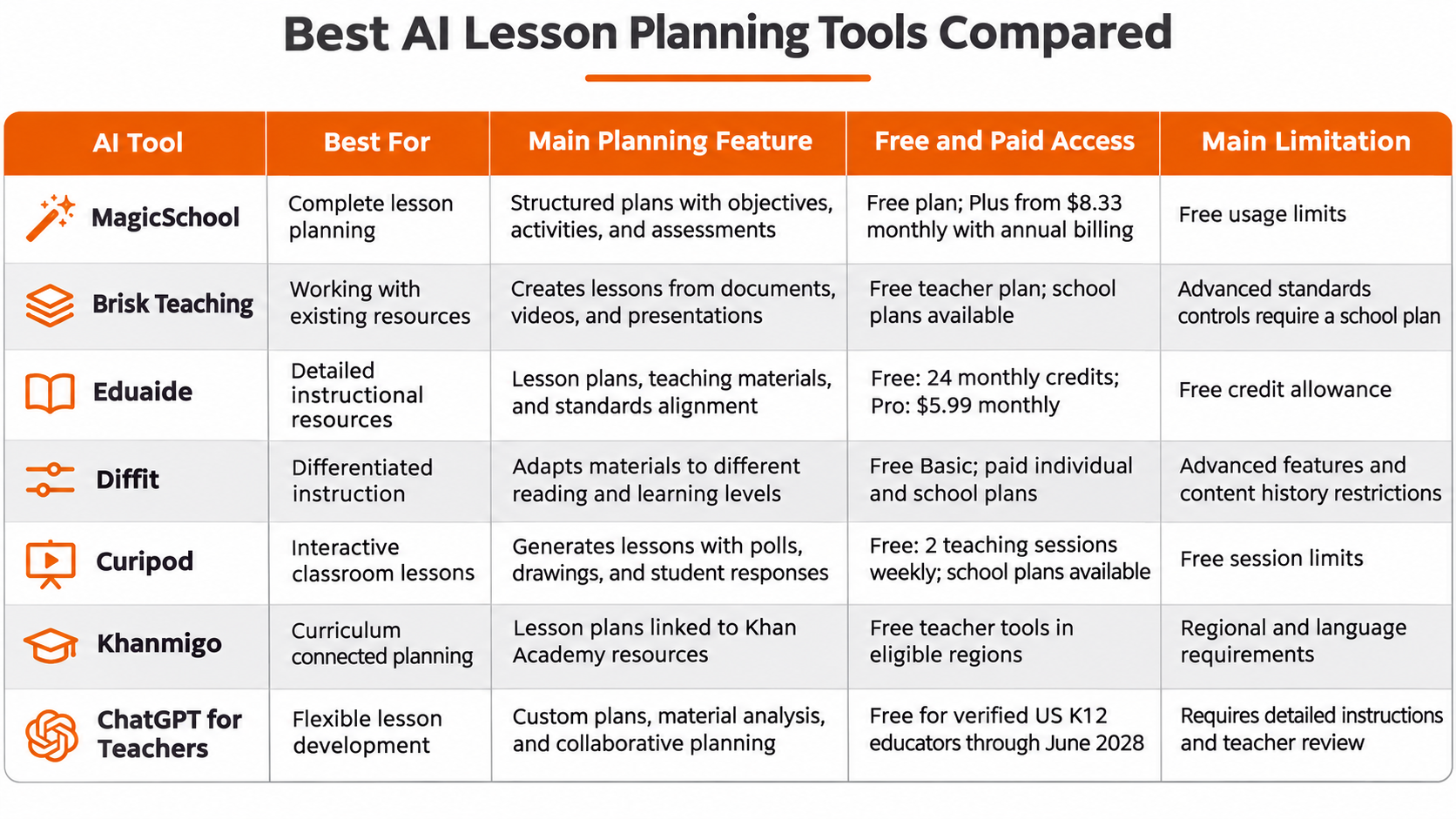
The distinction is straightforward. MagicSchool and Eduaide are strong starting points for building instructional plans. Brisk and Diffit are more useful when source materials already exist. Curipod focuses on what students do during the lesson, while Khanmigo and ChatGPT for Teachers support broader planning decisions.
MagicSchool: Best for Complete Lesson Plans
Best for: Teachers who want one platform for planning lessons and preparing supporting materials.
MagicSchool is designed around everyday teaching tasks.
Its AI Lesson Plan Generator accepts the subject, grade level, learning objectives, curriculum standards, and available teaching time. It produces a structured draft that teachers can revise for their classroom.
For a seventh grade science lesson on ecosystems, the teacher can specify the learning objective, lesson duration, and required activities before generating the plan.
That structure is valuable because lesson preparation rarely ends with an outline. Teachers also need worksheets, assessment questions, and activities that fit the same objective.
MagicSchool provides these functions within a larger collection of educational tools.
Main strengths: Structured lesson generation, curriculum alignment, differentiated materials, and connected planning resources.
Access and pricing: The Free plan provides core tools. MagicSchool Plus costs $12.99 per month with monthly billing or $8.33 per month with annual billing.
Limitation: Free accounts have usage restrictions, and generated standards alignment still requires verification.
Best choice for: Teachers who want a dedicated planning platform rather than a general AI chatbot.
Brisk Teaching: Best for Existing Classroom Materials
Best for: Teachers who plan lessons using Google Docs, presentations, PDFs, videos, and online resources.
Brisk Teaching approaches lesson planning through the materials teachers already use.
Instead of opening a separate tool and rebuilding everything from scratch, teachers can work from an existing document, webpage, video, or presentation.
Brisk can turn a source into a lesson plan, quiz, presentation, or other instructional resource.
Consider a teacher preparing a history lesson around a documentary.
With Brisk, the video becomes the starting point for developing classroom activities. The teacher does not need to transfer the entire source into a separate planning document before generating materials.
The browser extension integrates with existing teaching workflows, making it particularly useful for schools working with Google Workspace.
Main strengths: Source based content creation, browser integration, instructional materials, and document workflows.
Access and pricing: Brisk provides a Free Forever plan with more than 20 core tools. Additional school and district features are available through paid arrangements.
Limitation: Advanced curriculum standards management is included in school and district plans.
Best choice for: Teachers who want to prepare lessons directly from resources they already trust.
Eduaide: Best for Instructional Design
Best for: Teachers who need structured learning objectives, differentiated activities, and curriculum aligned resources.
Eduaide focuses on generating educational materials through teaching frameworks and specialized templates.
Its library includes lesson plans, worksheets, rubrics, graphic organizers, classroom games, and assessment resources.
This matters when the quality of a lesson depends on more than the information being presented.
A teacher planning a literature lesson, for example, needs objectives that connect reading activities to the skills students must demonstrate.
Eduaide supports the creation of those connected resources within the same educational platform.
Its standards alignment features also make the tool relevant for teachers working within formal curriculum requirements.
Main strengths: Instructional templates, curriculum alignment, assessment resources, and multiple export formats.
Access and pricing: The free plan includes 24 monthly credits, enough for up to eight lesson plans or other resources. Eduaide Pro costs $5.99 per month or $49.99 per year.
Limitation: The free plan supports alignment with one standard per resource. The Pro plan expands that limit to five standards and provides additional differentiation features.
Best choice for: Teachers who want affordable, structured educational resources with clear curriculum connections.
Diffit: Best for Differentiated Lesson Materials
Best for: Teachers working with students who need different reading levels, language support, or instructional scaffolding.
Diffit addresses a specific challenge in lesson preparation: one classroom contains students with different learning needs.
A single reading passage is not equally accessible to every student.
Diffit allows teachers to create or adapt instructional materials around a topic, document, or educational standard.
Teachers can adjust the reading level, generate vocabulary support, create comprehension questions, and develop additional activities around the same core content.
For example, a teacher preparing a lesson about climate change can retain the central scientific concepts while adapting the reading demands for different groups.
This makes Diffit especially useful for differentiated instruction.
Main strengths: Reading level adaptation, vocabulary support, comprehension activities, and resource customization.
Access and pricing: Diffit offers a free Basic plan and paid individual and school subscriptions.
Limitation: Free users have access to content created within the previous 90 days. Additional features and access require a paid plan.
Best choice for: Teachers who already know what they want to teach but need materials that support a broader range of learners.
Curipod: Best for Interactive Lessons
Best for: Teachers who want students to participate actively during classroom instruction.
Curipod connects lesson creation with interactive delivery.
Teachers can generate lessons containing polls, word clouds, drawings, open responses, and activities that collect student input.
This approach changes what an AI lesson planner produces.
Instead of preparing a document that tells the teacher what to do, Curipod helps build an experience students can participate in.
For a lesson about environmental issues, students can submit ideas through a word cloud, respond to a poll, and complete an open response activity.
The teacher can use those responses to guide classroom discussion.
Main strengths: Interactive presentations, student participation, visual activities, and AI supported feedback.
Access and pricing: Curipod provides a free plan with two teaching sessions per week and additional school subscription options. Reusing the same lesson across several classes within a week counts as one session under its published rules.
Limitation: The free plan restricts teaching sessions, and live activities require the necessary classroom technology.
Best choice for: Teachers who want to move from a written lesson plan to an interactive classroom experience.
Khanmigo: Best for Khan Academy Curriculum Support
Best for: Teachers who use Khan Academy materials and need curriculum connected lesson planning.
Khanmigo provides teacher tools within Khan Academy's educational environment.
Its planning functions include lesson creation, learning objectives, rubrics, exit tickets, and suggestions for related instructional resources.
The main advantage is the connection between planning and established educational content.
A mathematics teacher can develop a lesson around a specific concept and identify supporting Khan Academy activities for practice.
Khanmigo also provides tools that help teachers review student learning and prepare the next instructional steps.
Main strengths: Curriculum connected lesson plans, learning objectives, exit tickets, and integration with Khan Academy resources.
Access and pricing: Khanmigo Teacher Tools are free for educators in eligible countries and supported languages.
Limitation: Access requires a teacher account and compliance with regional requirements. The free teacher tools are unavailable in certain regions, including Iran.
Best choice for: Teachers already using Khan Academy as part of their instructional routine.
ChatGPT for Teachers: Best for Flexible Lesson Development
Best for: Teachers who want detailed control over lesson structure, activities, and instructional materials.
ChatGPT for Teachers provides a flexible planning workspace rather than a single lesson plan generator.
Teachers can supply curriculum documents, describe classroom requirements, and request lesson outlines or supporting resources.
The result depends on the instructions and materials provided.
For example, a teacher can request a 45 minute lesson containing an introductory activity, direct instruction, guided practice, independent work, and an exit ticket.
The teacher can then revise individual sections without regenerating the entire plan.
The workspace also supports collaboration and document based planning.
Main strengths: Flexible lesson design, document analysis, collaborative workflows, and customizable instructional materials.
Access and pricing: ChatGPT for Teachers is free through June 2028 for verified educators working in eligible United States K12 settings.
Limitation: It requires clearly defined learning objectives and teacher review. It does not automatically verify every curriculum standard or classroom assumption.
Best choice for: Teachers who want to develop and refine their own planning approach instead of relying on fixed templates.
Free vs Paid AI Lesson Planning Tools
A free AI lesson planner is sufficient when its available features match the teacher's actual preparation workload.
MagicSchool and Brisk provide free access to core lesson planning tools. Khanmigo offers free teacher resources in supported regions.
Eduaide places a clear monthly limit on its free credits, while Curipod restricts the number of teaching sessions.
These limits affect different parts of the workflow.
A teacher producing five written lesson plans each week needs to consider generation allowances. A teacher delivering interactive lessons across several classes needs to consider session limits instead.
Paid access becomes more valuable when teachers require expanded usage, additional differentiation features, or schoolwide management.
The strongest purchasing decision is based on a repeatable classroom need.
Before paying for an upgrade, establish which limitation prevents the required work from being completed.
For schools evaluating multiple teacher accounts, individual subscription prices are only one part of the decision. Administrative controls, data agreements, account management, and staff access also require consideration.
Lesson Plan Quality and Classroom Readiness
An AI generated lesson plan can look complete while leaving important teaching decisions unresolved.
A useful plan must connect its objectives, activities, time allocation, and assessment.
Consider a 45 minute seventh grade science lesson about food webs.
The learning goal is for students to explain how changes to one population affect other organisms in a food web.
A classroom ready draft should support that goal from beginning to end.
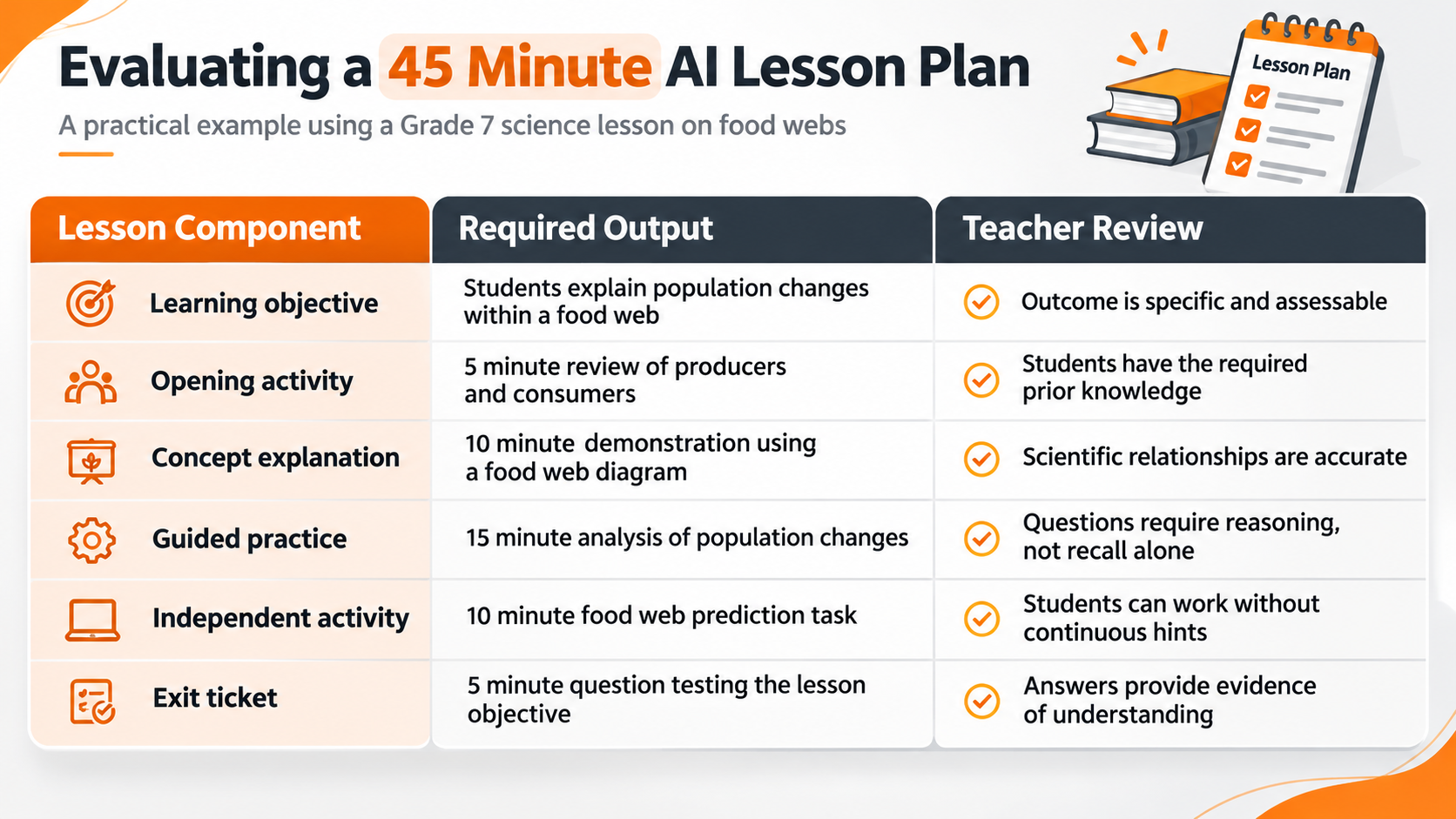
This structure provides a concrete way to judge the output of any AI lesson plan generator.
The activities must fit the available teaching time, and the final assessment must measure the stated objective.
A lesson that includes engaging activities but never tests the intended learning outcome is incomplete.
The same principle applies to curriculum alignment. An AI system can include a standard in its output, but the teacher must confirm that the lesson genuinely addresses it.
Choosing AI Lesson Planning Software
The right tool should fit the way lesson preparation already happens.
Teachers who build plans from an empty template benefit from structured generators such as MagicSchool and Eduaide.
Teachers who work from textbooks, existing documents, and online videos benefit from Brisk.
Diffit is particularly relevant when students need differentiated reading materials or additional scaffolding.
Curipod makes sense when the lesson depends on student interaction and classroom discussion.
Khanmigo is appropriate when Khan Academy is already part of the curriculum.
ChatGPT for Teachers offers flexibility when planning requires several rounds of revision or work across different source documents.
There is also a practical distinction between lesson generation and lesson management.
Generating a plan is one task. Organizing an entire unit, preserving previous versions, coordinating with colleagues, and maintaining a usable curriculum library are separate requirements.
Before selecting an AI lesson planning platform, teachers should check whether it supports the workflow they need after the initial draft is created.
Creating Better Lesson Plans With AI
The quality of an AI generated lesson begins with the information supplied to the tool.
A request such as "Create a science lesson" leaves the grade level, learning goal, lesson duration, and assessment requirements undefined.
A stronger request provides instructional context.
For example:
Create a 45 minute Grade 7 science lesson about food webs. The learning objective is for students to explain how changes in one population affect other organisms. Include a five minute opening activity, a clear concept explanation, guided practice, independent work, and an exit ticket. Add learning support for students who need simplified reading materials. Assign realistic time limits to every activity.
This request provides the tool with a structure it can follow.
The next step is to review the generated lesson against the curriculum and classroom requirements.
A practical review focuses on four decisions:
Curriculum accuracy: Confirm that the content and learning objectives match the required standards.
Instructional sequence: Check that each activity builds toward the intended learning outcome.
Classroom suitability: Adjust materials, group activities, and support for the students involved.
Assessment quality: Confirm that the final questions measure what the lesson was designed to teach.
The purpose is not to produce the longest lesson plan.
It is to prepare a lesson that teachers can deliver clearly and students can learn from.
Student Data and School Requirements
AI lesson planning tools process the information teachers provide.
That makes account permissions, student data handling, and institutional policies part of the tool selection process.
A lesson topic and a publicly available curriculum standard do not present the same privacy concerns as an identifiable student record.
Teachers should avoid uploading confidential student information into services that have not been approved for that purpose.
Schools should also establish who can access generated materials, how classroom information is retained, and whether the platform provides the required administrative controls.
For teachers using school managed accounts, the approved workspace and data agreement determine which information can be processed.
Privacy and curriculum compliance should be assessed before the tool becomes part of routine lesson preparation.
Final Thoughts
The best AI lesson planning tools solve different problems for teachers.
MagicSchool provides broad lesson planning capabilities, Brisk works directly with existing resources, and Eduaide supports structured instructional design.
Diffit improves access to learning materials, Curipod supports interactive delivery, Khanmigo connects planning with educational content, and ChatGPT for Teachers offers flexible lesson development.
The right choice is the platform that produces useful teaching materials with the least unnecessary preparation and revision.
A strong AI lesson planner gives teachers more time to focus on instruction while keeping responsibility for learning objectives, classroom decisions, and student outcomes in their hands.
FAQ
Can you use an AI lesson planner without a school email?
Yes. Platforms such as MagicSchool and Eduaide offer individual teacher registration. Khanmigo requires an eligible Khan Academy account with the teacher role. Specific account verification requirements depend on the provider, and school managed platforms can impose additional restrictions.
Can you use AI generated lesson plans without internet in the classroom?
Yes. Teachers can prepare and export lesson materials in advance, then use printable documents or downloaded resources during instruction. Live tools that collect student responses, such as Curipod, require connectivity for their interactive functions.
Can you share AI generated lesson plans with other teachers?
Yes, when the platform's sharing features and applicable licensing terms permit it. Teachers can exchange exported documents or use supported collaboration functions. Plans containing identifiable student information must follow the school's privacy and access policies.
Can you turn last year's lesson plans into updated versions?
Yes. Tools that accept existing documents or text can help revise objectives, activities, reading levels, and assessment questions. Teachers must verify that the updated content reflects the current curriculum requirements and any changes to the teaching schedule.
Can an AI lesson planner prepare materials for a substitute teacher?
Yes. Teachers can generate substitute lesson outlines, student instructions, independent activities, and supporting worksheets. The finished materials should include the required classroom procedures, available resources, estimated activity durations, and instructions that do not depend on knowledge held only by the regular teacher.

Fatemeh Jahangard
Technology & AI Writer at PinerookFatemeh Jahangard covers AI, emerging technologies, and digital innovation for Pinerook, focusing on how technology shapes startups and industries.
 Seen first.