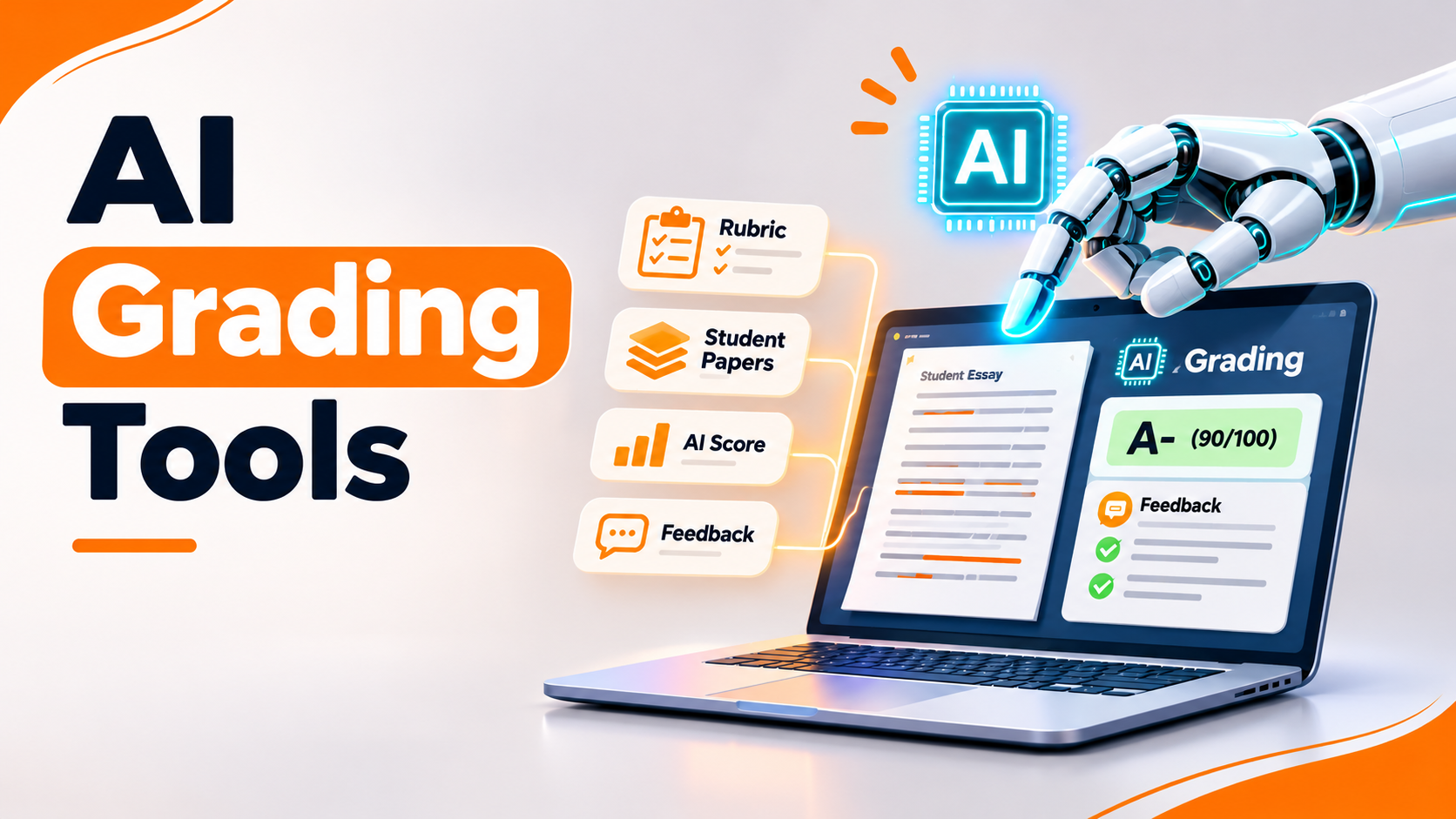
The best AI grading tools help teachers evaluate student work faster without giving up control over the final grade. CoGrader and EssayGrader specialize in scoring written assignments, Gradescope supports large exam and problem set workflows, and Class Companion combines rubric scoring with student feedback. Brisk Teaching and MagicSchool are better suited to teachers who want help writing feedback rather than automating grades.
The important distinction within AI in Education is that grading and feedback are not the same task. A tool can produce excellent comments without assigning a score, while another can calculate rubric scores but miss the reasoning behind a student's response. The right choice depends on what needs to be evaluated, how much work arrives each week, and how the teacher reviews the result.
Best AI Grading Tools for Teachers
A useful AI grader should match the assignment before it matches the budget. Essays, handwritten examinations, short responses, and classroom writing exercises require different assessment workflows.
These six tools address those needs in distinct ways.
CoGrader: Best for Rubric Based Essay Grading
Best for: Teachers who grade essays, constructed responses, and other written assignments against defined criteria.
CoGrader is built around the relationship between a student's writing and the teacher's rubric.
Teachers can create a rubric or use an existing one, submit student work, and receive suggested scores with feedback for individual criteria.
That approach is particularly useful for English and humanities assignments, where a single overall score explains very little.
Consider a history essay assessed on argument, evidence, organization, and analysis. CoGrader can examine those elements separately, giving the teacher a clearer starting point for evaluating the response.
It also supports written assignments across other subjects, including short responses and science explanations.
Main strengths: Custom rubrics, suggested scores, criterion level feedback, classroom integrations, and teacher approval before grades are released.
Pricing: The Starter plan is free and includes 150 student submissions per month. Paid plans provide higher allowances and additional capabilities.
Limitation: Its strongest use case is written work. It is not a universal solution for every mathematics or laboratory assessment.
Verdict: One of the most practical starting points for teachers who need an AI assignment grader that produces both scores and meaningful writing feedback.
EssayGrader: Best for Large Volumes of Written Assignments
Best for: Teachers who regularly assess essays, research papers, and extended writing.
EssayGrader focuses on reducing the work involved in reviewing large numbers of written submissions.
Teachers can assess essays against rubrics, review suggested scores, and generate feedback explaining the student's performance.
The platform also provides tools for handling classes, organizing submissions, and monitoring writing performance.
This makes it relevant for teachers who assign writing every week rather than once per term.
Its paper grading features extend the workflow to scanned handwritten and printed submissions.
Main strengths: Essay scoring, customizable rubrics, batch grading workflows, writing feedback, and classroom management.
Pricing: The Basic plan provides up to 100 essays per month, with a limit of 1,000 words per essay. The listed Pro plan provides 350 essays per month for $14.99 monthly under its published pricing offer.
Limitation: Free accounts have word count and submission limits. The tool is centered on written assessments rather than every type of academic work.
Verdict: A strong option for teachers whose grading workload consists mainly of essays and other substantial writing assignments.
Gradescope: Best for Handwritten Exams and STEM Courses
Best for: University instructors and teachers managing scanned examinations, problem sets, and large classes.
Gradescope approaches grading differently from an AI essay grader.
Its most useful feature is organizing similar student responses so instructors can evaluate them consistently.
For supported examination formats, AI assisted answer grouping identifies responses with similar content and presents them together.
The instructor reviews the groups and applies grading decisions.
For example, a mathematics instructor marking 150 examination papers can group answers to the same question, inspect the proposed groupings, and apply rubric decisions across matching responses.
This reduces repeated marking without asking the AI to make every assessment judgment independently.
Gradescope also supports programming assignments, quizzes, and other examination formats through separate grading workflows.
Main strengths: Handwritten response processing, answer grouping, rubric based marking, exam management, and support for large courses.
Pricing: A Basic offering is available. AI assisted answer grouping requires an eligible institutional license, with institutional pricing provided separately.
Limitation: AI assisted grouping is restricted to supported question types in fixed template PDF examinations. It is not available for every assignment format, including ordinary homework problem sets.
Verdict: The most relevant choice in this comparison for instructors who need to manage large collections of handwritten examination responses.
Class Companion: Best for Continuous Student Feedback and Scoring
Best for: Teachers who want students to receive rubric based feedback while completing assignments.
Class Companion combines assignment delivery, AI scoring, and guided feedback.
Teachers can create activities containing essays, short answers, and multiple choice questions, then apply rubrics to the responses.
Students can receive feedback during the assignment or after completing it, depending on the teacher's settings.
This creates a different grading experience from uploading a completed stack of essays.
For example, students writing an argumentative paragraph can receive feedback that helps them improve their reasoning before submitting a final version.
Teachers can also review student performance and identify areas that require further instruction.
Main strengths: Rubric based scoring, immediate feedback, student revision, multiple question types, and classroom insights.
Pricing: Individual teachers can use a free plan. Schools and districts can obtain additional capabilities through institutional arrangements.
Limitation: The platform is built around its own assignment and student interaction workflow. Schools requiring extensive administrative features or LMS integration need to evaluate the institutional offering.
Verdict: A strong fit for teachers who want scoring and feedback to support learning throughout an assignment, not just at the end.
Brisk Teaching: Best for Feedback in Google Docs
Best for: Teachers who want to review student writing and provide comments within familiar classroom tools.
Brisk Teaching is especially useful when the teacher's main challenge is writing individual feedback.
Its browser based workflow allows teachers to work directly with student documents.
The feedback tools can highlight strengths, suggest improvements, identify next steps, and use uploaded rubric criteria.
In Google Docs, teachers can review suggested comments before inserting them into the student's work.
This is valuable for writing instruction, where explaining what to improve matters as much as identifying the problem.
Brisk also offers broader classroom feedback workflows for handling multiple submissions.
Main strengths: Document integration, personalized comments, rubric aligned feedback, and teacher controlled revisions.
Pricing: Core educator tools are available free. Additional features are offered through individual premium and school plans.
Limitation: Its primary strength is generating feedback. Teachers seeking a dedicated system that calculates and manages final assignment scores should consider specialized grading platforms.
Verdict: Best suited to teachers who already grade student work themselves but want to deliver clearer feedback with less repetitive writing.
MagicSchool: Best for Feedback Within a Broader Teaching Platform
Best for: Teachers who want writing feedback, rubric creation, and classroom preparation tools in one workspace.
MagicSchool includes tools for producing rubrics and writing feedback based on teacher supplied criteria.
Its Class Writing Feedback workflow helps teachers review student submissions and draft comments connected to their assessment expectations.
The broader platform also supports lesson planning, differentiation, and instructional content.
This matters for teachers who prefer using one educational workspace rather than moving between several separate products.
A teacher can prepare an assignment rubric, use it to guide feedback, and adjust the comments before sharing them with students.
Main strengths: Rubric creation, writing feedback, integrated teaching resources, and educator oversight.
Pricing: A free plan provides core tools with usage limits. Plus expands access, while Enterprise serves schools and districts.
Limitation: MagicSchool is not primarily a dedicated automated grading system. Its grading support emphasizes rubrics and feedback rather than replacing the teacher's scoring decision.
Verdict: A practical choice for teachers who need broader classroom assistance alongside writing feedback.
AI Grading Tools Comparison
The key purchasing decision is whether the tool actually assigns a suggested score, only prepares feedback, or helps the teacher organize responses for manual marking.
The following comparison separates those functions while showing the main access conditions.
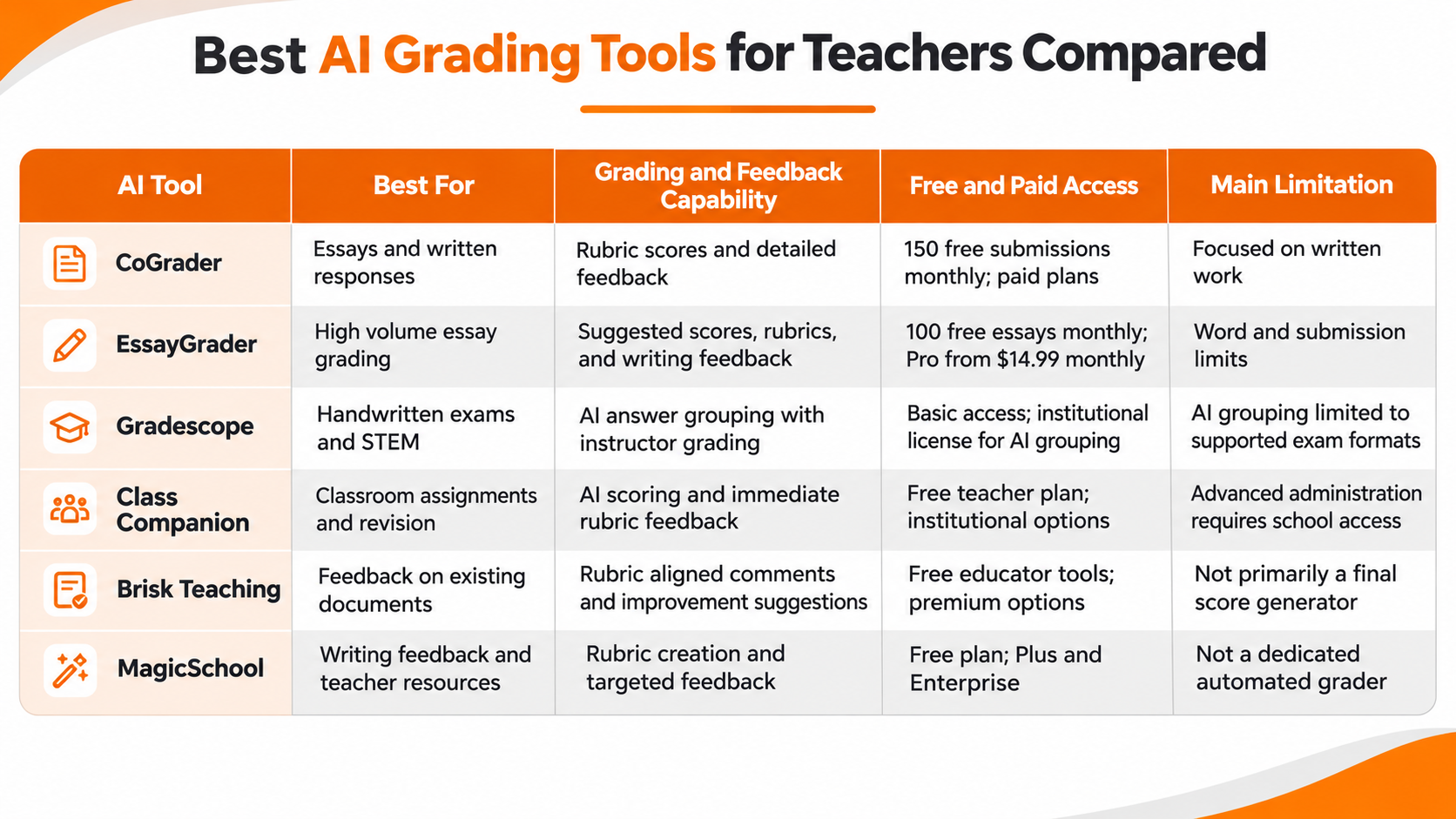
For teachers who need numerical scores, CoGrader, EssayGrader, and Class Companion are the more direct options.
Gradescope addresses a different problem: applying grading decisions efficiently across similar examination responses.
Brisk and MagicSchool help with feedback, which is useful but should not be mistaken for automated scoring.
This distinction should guide the choice before any paid subscription is considered.
AI Grading by Assignment Type
The format of student work determines which capabilities are worth paying for.
Essays and Extended Writing
Essays need assessment criteria that distinguish argument quality, evidence, organization, and writing conventions.
CoGrader and EssayGrader are designed for these tasks.
Both allow teachers to work with rubrics rather than relying on an unexplained overall grade.
Brisk and MagicSchool are stronger alternatives when the teacher needs comments and revision guidance without delegating scoring.
Short Answers and Constructed Responses
Short answers require close attention to the expected concept.
An answer can be brief and accurate without matching the wording of a model response.
CoGrader supports rubric based evaluation of constructed responses, while Class Companion supports short answer assignments with feedback and scoring.
For this category, a useful grader must recognize valid alternative explanations rather than reward a specific phrase.
Handwritten Mathematics and Examinations
Handwritten work introduces an additional requirement: identifying the student's response correctly before evaluating it.
Gradescope supports scanned examinations and AI assisted grouping for eligible formats.
Its workflow is particularly valuable when many students answer the same examination questions.
Teachers must still inspect the reasoning and confirm that suggested answer groups are appropriate.
Programming and Technical Assignments
Programming assignments require a different approach from essay scoring.
A technically correct solution may use a structure that differs completely from the instructor's reference answer.
Gradescope supports programming assignments through workflows that include automated code evaluation.
However, code testing and AI generated commentary should be distinguished from evaluating design quality, reasoning, or maintainability.
The assessment method must match the learning objective.
Rubric Based AI Grading and Teacher Control
A rubric is the foundation of a defensible grading workflow.
Without clear criteria, an AI grader can produce a plausible score without showing how the assignment requirements were applied.
Consider a short science explanation worth ten points.
The teacher defines three criteria:
Scientific accuracy: four points.
Use of evidence: four points.
Clarity of explanation: two points.
A useful AI grader should evaluate these elements separately.
If a student receives two points for evidence, the feedback should identify which evidence was missing or incorrectly interpreted.
That is more useful than a general statement that the answer needs improvement.
The teacher then reviews the assessment before accepting the proposed score.
This review is especially important when a response demonstrates understanding through an unexpected but valid explanation.
Rubric based AI grading should make the reasoning behind a score visible, not simply attach a number to student work.
The teacher's control over editing scores, correcting comments, and approving the outcome is therefore a central selection criterion.
Free vs Paid AI Grading Software
Free access has different meanings across grading platforms.
CoGrader's published Starter plan includes 150 submissions per month.
EssayGrader Basic offers 100 monthly essays with a 1,000 word limit.
Class Companion provides free access for individual teachers, while Brisk and MagicSchool offer free access to core educational tools.
Gradescope offers Basic access, but its AI assisted answer grouping requires eligible institutional licensing.
These differences have a direct effect on cost.
A teacher grading 120 essays each month could fit within CoGrader's published free submission allowance, provided the assignments meet the plan requirements.
The same workload exceeds EssayGrader's published 100 essay monthly allowance.
However, submission volume is only one factor. Essay length, batch processing, classroom integrations, and required grading features also affect the choice.
For paid plans, compare the cost against the number of assignments that must be reviewed each month.
A low subscription price is not a saving if the platform does not support the required assessment format.
AI Grading Accuracy and Reliability
AI grading tools should be evaluated with actual assessment examples rather than vendor accuracy claims alone.
A published research study examining language models grading university biology essays found that agreement with human assessors differed across rubric criteria.
Structural writing features were easier to evaluate consistently than criteria involving disciplinary understanding, ethical reasoning, and the integration of complex ideas.
Other research on automated essay scoring has identified differences between AI scores and expert human judgments, including scoring patterns that do not match human evaluations.
These findings matter because grading accuracy is not one universal percentage.
A system can perform well on one type of writing while showing weaker agreement on another.
A Practical Grading Accuracy Check
Before using an AI grading tool for a class, select a small sample of previously marked assignments.
Include strong, average, and weak responses, along with examples that received borderline scores.
Use the existing rubric to compare the AI results with the teacher's original grading.
Check three elements:
Score agreement: Identify differences in overall and criterion scores.
Feedback accuracy: Confirm that comments refer to evidence actually present in the student's work.
Consistency: Review whether equivalent responses receive equivalent treatment.
A disagreement is not automatically evidence that the AI is wrong. It is a reason to inspect the rubric and the response.
This comparison reveals whether the tool suits the actual assignments being graded.
LMS Integration and Student Privacy
A grading tool becomes part of a teacher's daily workflow only when student submissions can move through it efficiently.
Teachers using Google Classroom should check how assignments are imported, how feedback is returned, and whether grades can be transferred to the existing gradebook.
Schools using Canvas, Schoology, or another learning management system need to verify the features included in their chosen subscription.
These connections are not identical across all platforms or plans.
Privacy requires separate attention.
Student submissions can contain names, personal experiences, learning difficulties, and other protected educational information.
Teachers should confirm that the selected service is approved under their institution's policies before uploading identifiable student work.
A provider's statement about FERPA compliance is useful information, but it does not replace the school's own review of access controls, retention practices, contractual terms, and permitted data processing.
The most convenient integration is not automatically the most appropriate one for confidential assessment data.
Choosing the Right AI Grader
The clearest way to select an AI grading platform is to begin with the task that consumes the most marking time.
For essay scoring, compare CoGrader and EssayGrader first.
For handwritten examinations and large university classes, evaluate Gradescope.
For assignments where students benefit from immediate feedback and revision, consider Class Companion.
For writing comments within Google Docs, Brisk is a more direct fit.
For teachers who need feedback alongside lesson planning and rubric creation, MagicSchool offers a broader workspace.
The final decision should answer four practical questions:
Does the tool support the actual assignment format?
Does it calculate scores, produce feedback, or both?
Can the teacher inspect and change the result before it becomes final?
Does the available plan support the required workload and school environment?
A product that meets these requirements is more valuable than one offering a longer list of unrelated AI features.
Final Thoughts
AI grading tools are most effective when they reduce repetitive assessment work while preserving the teacher's authority over the result.
CoGrader and EssayGrader focus on written assignments. Gradescope helps instructors manage large examination workloads. Class Companion connects scoring with ongoing student feedback, while Brisk and MagicSchool support the feedback process.
The best AI grading software is not necessarily the tool that produces a grade fastest.
It is the one that fits the assignment, explains its evaluation clearly, and allows the teacher to make an informed final decision.
FAQ
Can I change the rubric after the AI has already graded everything?
Changing a rubric after grading requires reassessing the affected submissions against the revised criteria. Some platforms provide tools to repeat grading or update scoring workflows, while others require teachers to rerun the assessment. Previously issued grades should be handled according to the institution's grade revision policy.
Can I use an AI grader for assignments written in another language?
Language support depends on the platform and the assessment task. CoGrader supports writing instruction across multiple languages. Before grading an entire class, teachers should validate the selected language and rubric using representative student responses, especially when grammar, idiomatic expression, or cultural context affects scoring.
Can students challenge a grade suggested by AI?
Students should have access to the institution's established grade review or appeal process. A teacher must examine the original submission, relevant rubric criteria, and evidence supporting the score. AI generated explanations do not replace the educator's responsibility to justify an assessment decision.
Can an AI grader handle group projects with one shared submission?
A shared submission can be evaluated against common project criteria, but assigning individual scores requires evidence of each participant's contribution. Teachers should use documented participation records, individual reflections, or other approved evidence when separate grades are required.
Can I move my grading records to a different platform later?
Data portability depends on the platform's export functions and the receiving system's supported formats. Before adopting a grading service, institutions should verify whether scores, rubric details, feedback, and student records can be exported in usable formats and retained according to their records policy.

Fatemeh Jahangard
Technology & AI Writer at PinerookFatemeh Jahangard covers AI, emerging technologies, and digital innovation for Pinerook, focusing on how technology shapes startups and industries.
 Seen first.